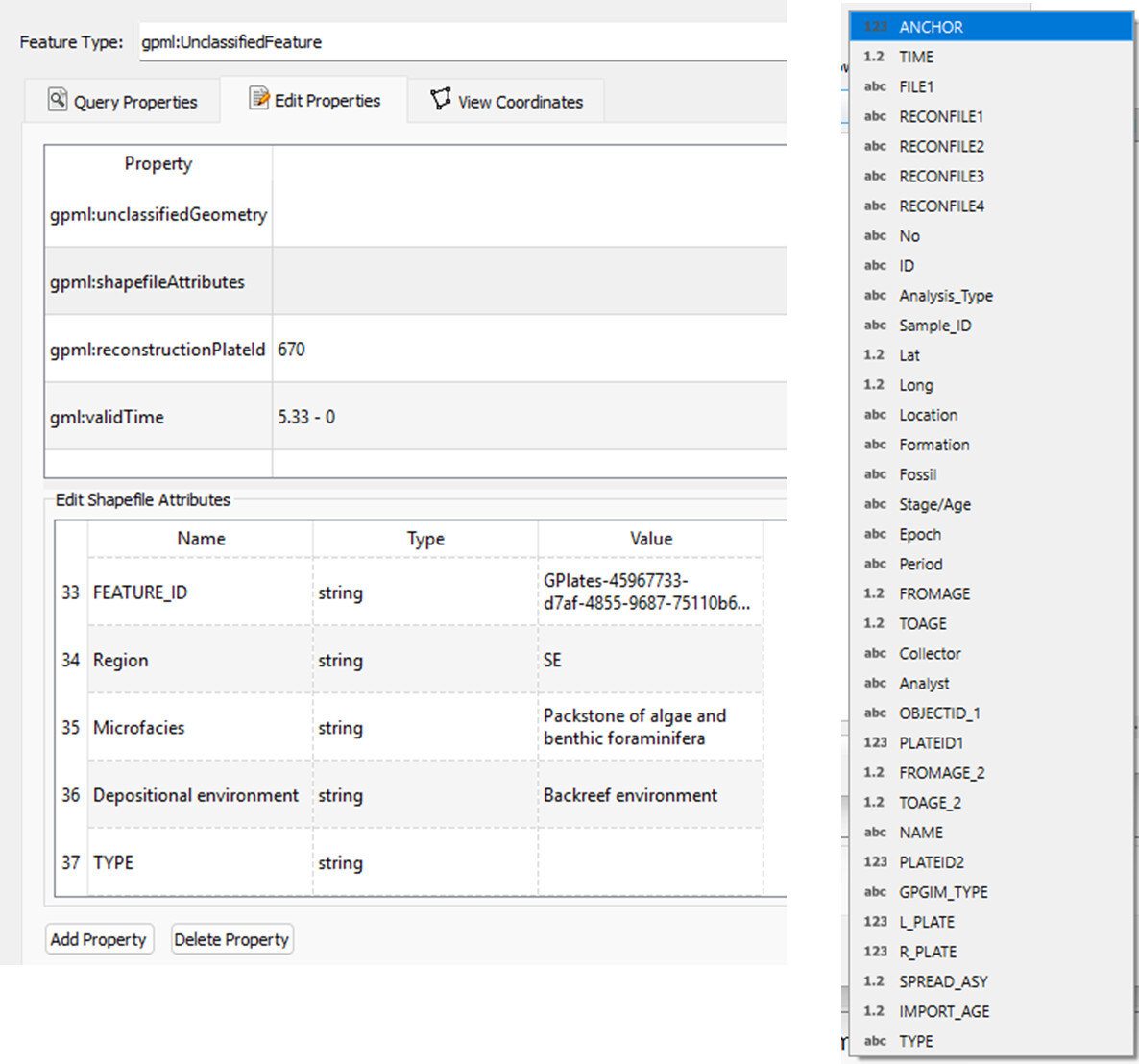
I’ve had current issue when exporting some files with quite long columns (there are no issue with shorter columns). I’ve rechecked the column order and notice that the GPlates trims some columns at the end of the attribute table.
I originally have 39 columns and it’s also written under gpml:shapefilesAttributes, but I missed the 6-end columns after exporting. I know that GPlates will creates new column names such as accommodating anchor/time/file/reconfiles etc apart from those original columns when exporting.
The question is how can I keep all the attribute table columns are flawlessly exported?
first question would be which file format you’re using to export and whether you’ve checked that the column truncation issue occurs across the different formats GPlates can export (e.g. OGR_GMT, ESRI Shapefile,GPKG, GPML).
If you run into problems like this, posting your input data (a minimum working example), the stuff you’ve done to it (as detailed and relevant to the problem as possible), the resulting output data, and such things like version of GPlates & operating system would be a minimum requirement to get some sensible feedback.
Should you’ve used ESRI Shapefiles there are a number of well known limitations. The answer to many problems related to Shapefile usage is here and it is called Geopackage.
As GPlates uses the GDAL Library for converting data to other geospatial formats (AFAIK), it is likely a format limitation. GPlates’ native file format is GPML (a derivative of the Geographic markup language, an XML-based text format) - that should be a base case where things just work.
I’m using GPlates 2.5 and Win10. I have tried .geojson and .shp formats when exporting Reconstructed Geometries data type and the result are similar.
On the left side of this screenshot, which was opened in GPlates, is a .gpkg file which contains gpml:shapefilesAttribute of region, microfacies, depositional environment, etc.
However, when I exported the reconstructed files at 5Ma either to .geojson or .shp and opened in QGIS, some of the attributes (e.g., region, microfacies, depositional environment) are missing (right-hand side of the screenshot) even though it’s within a valid time.
thanks - this helps. So reading the GPKG results in GPlates displaying all attributes as they would display in QGIS by the sounds of it. Can you try and export as OGR-GMT files and check whether your attributes persist in those files? I also realised that there’s no GPML or GPKG export option… apologies.
It might be good to minimise the amount of extra layers in your project as -like you wrote- GPlates will add extra columns to capture names of additional files in the reconstruction. Then I also see that there are things like Lat and Lon (captured by the geometry, not necessary as attributes) in the attributes of your input file as well as doubled up ones likeFROMAGE_2TOAGE_2 and others which could help bring down the total number of columns in the input data.
Other than that I don’t really have different suggestions. This might be something that happens in the code where @john.cannon would have to chip in. One test would be to try the whole workflow in pyGPlates and check whether the same problem persists.
What happens if you go the Feature Manager window (ctrl + m) and save your file in a different format? Do you see the attribute truncation there as well?
A lot depends on your post-reconstruction processing - given that this currently looks like a GPlates-internal limitation, I would just try and cut down the attributes to the ones you strictly require for the processing done after reconstruction.
Hi Christian and John, thanks for your reply and suggestions.
OGR-GMT returns the same, it is trimmed as well. Using Feature Manager window (ctrl + m) seems to be saving the unreconstructed features, if I did the right thing (I saved either as .gpkg, .geojson, or .shp at reconstructed time in GPlates but it showed in present day position when I open in QGIS).
Yes, apparently there are column limitations. I exported a file which has 25 columns and it was fine.
I’ve tried using pyGPlates as per @john.cannon suggestion, yet it also trimmed some of the columns just like the GPlates itself. I’ve sent you a message relating to the files
That’s correct - they’ll be unreconstructed. It was just to see if there was truncation there as well. But it does sound like GPlates issue. Thanks for your PM by the way, I’ve sent my email address (also I didn’t realize that only basic image formats can currently be uploaded in discourse).