Hi,I’m encountering some issues with plate reconstruction in GPlates and would appreciate your guidance.
Background:
-
I created a shapefile containing numerous points in ArcGIS Pro
-
I followed the tutorial in Section 4 of https://docs.google.com/document to establish the PlateID column
-
I then opened the file in GPlates
Problem: When I move the time slider in GPlates, I’m observing two issues:
-
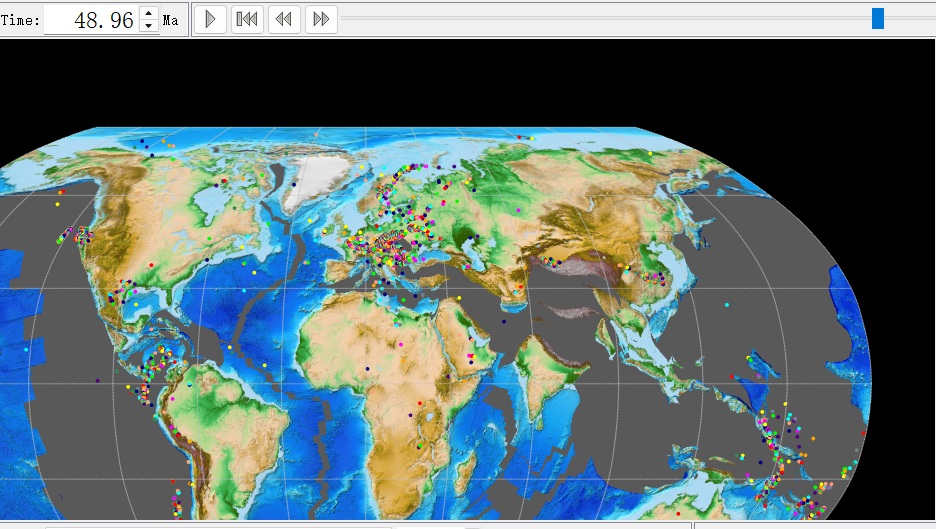
Only some of the points are rotating with time, while others remain stationary
-
The points that do rotate don’t appear to be moving to the correct positions
Question: How can I properly establish the relationship between my present-day point locations created in Arcgispro and their paleogeographic coordinates? What might I be doing wrong in the PlateID assignment or file preparation process?
I hope I’ve explained my problem clearly. Sorry to say that I’m not a native English speaker, and I’m not a geology student, so I may be missing some fundamental concepts. Any help would be greatly appreciated!
Thank you in advance for your assistance!
(Points in GPlates at approximately 50 Ma)
Which tutorial are you referring to? The link in your post doesn’t appear to point anywhere particular.
Sorry for the confusion in my previous message. The correct link is: https://tutorials.gplates.org/ tutorial 4.1: Managing Shapefiles within GPlates.
I got these Shp file provided in tutorials,then I created some new elements (also shp) in Arcgis.
I’m now facing an issue: how can I make these newly created elements rotate during plate reconstruction in GPlates? Any guidance would be greatly appreciated.
I’m so glad I’ve finally solved this! Here are some tips for students like me (just a GISer without any knowledge about plate reconstruction).
We usually use ArcGIS or QGIS to create features in shapefile format, and we can easily add a new attribute column named “PlateID”. At first, I was confused about this “ID” - I mistakenly thought it was just like the FID in ArcGIS. So I didn’t properly connect my target points to plates in the GPlates GPML file, which is why my points didn’t rotate with the time slider. As a complete beginner, I struggled to understand the relationship between each point and its corresponding plate.
Then I read another post in the forum where John mentioned (pyGplates API to rotate shapefiles - #2 by john.cannon) that we can use pip to install Pygplates and import points from a text file while assigning PlateID. So I generated a txt file from my shapefile and used Python 3.9 (note the version requirement - I also got stuck on this minor issue). Then I used Zahirovic_etal_2022_OptimisedMantleRef_and_NNRMantleRef.rot and 250-0_plate_boundaries.gpml to construct points of interest (POI) for the 50 Ma to present time period. (Actually, I’m not entirely sure if my use of these two files is correct or not.) With this setup, I can now export the 50 Ma positions to use in PaleoDEM for extracting paleo-topographic DEMs.
Here I want to thank John and the entire GPlates team once again. Your responses are always timely and detailed, especially the introduction and sample code of pyGPlates!