When I click Calculate uncertainties, the output file (e.g., *_results) is truncated to 0 KB (it has contents after Calculate pole). Also, Show details becomes empty. This suggests the uncertainties routine starts writing but crashes before completion.
Could you advise what conditions might cause the uncertainty calculation to fail?
If needed, I can provide a minimal sample dataset (pick files) that reproduces the issue.
Thanks.
Environment / Versions
OS: Windows 11
GPlates 2.5.0 (Windows): fails at Calculate uncertainties
GPlates 2.2 (Windows, another computer): same failure
GPlates 2.1 (Windows):Calculate pole does not work at all
What works / what fails
Calculate pole works and computes the Euler pole.
Calculate uncertainties always fails with “Unknown error.”
Notes
Output path is a simple ASCII path (e.g., C:\hellingertester\).
The failure happens even with simple and clean picks (no complex geometry).
Hi I have the same error messages when calculating a rotation pole (which by the way looks strange to me as it does not superpose the magnetic anomalies that I have picked in the Mascarene Basin…). Is there a picks file available that I could use to check that I am using the Hellinger tool correctly (although I do not see what I am doing wrong) ? Thanks
Hi Dan,
I was able to get the Calculate Uncertainty button to work when running this on GPlates 3.0 under Windows 10. So what I did was make the picks carefully in GPlates 3.5, then calculate the uncertainty in GPlates 3.0 instead.
For reference, GPlates 3.5 on Windows 11 did not work for me. I also tried several other versions multiple times, but none of them worked either.
I am not sure the picks themselves are the main issue here. If you just want to check whether this function is working properly, I would recommend creating a very simple set of picks and testing it first. If the same error still occurs, then I think it is more likely to be a software issue rather than a problem with the picks.
Thanks for your reply. In my case, I don’t think the picks themselves are the issue. I was able to work around it by doing the picking in GPlates 3.5 and then running Calculate Uncertainty in GPlates 3.0 on Windows 10. So it seems more like a software/version issue on certain Windows/GPlates setups.
Thanks for detailing the issues with the different versions of GPlates.
There were some issues with the Hellinger Python scripts (that calculate poles/uncertainties). Mostly due to changes in NumPy since 1.12. This is now fixed in this PR.
If you want you can try this dev build (link valid for 41 days only). If you do, let me know if there’s still an issue.
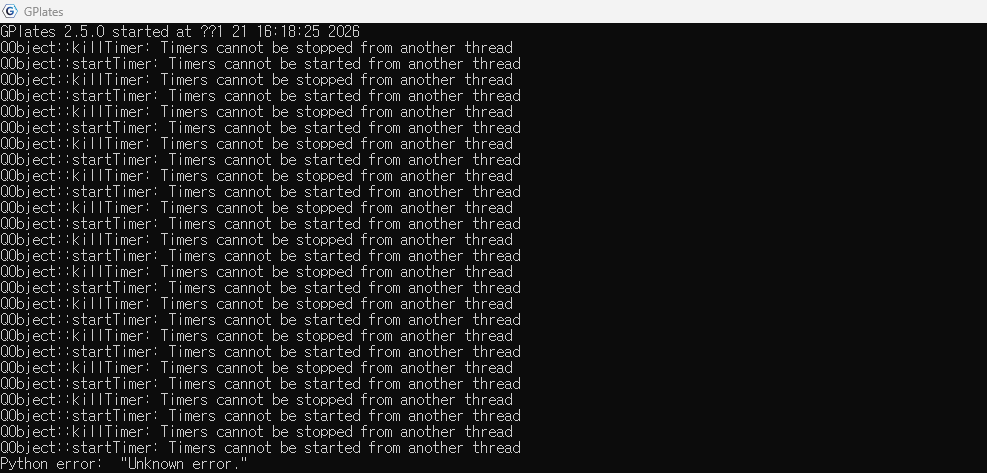
 Calculate pole works and computes the Euler pole.
 Calculate uncertainties always fails with “Unknown error.”