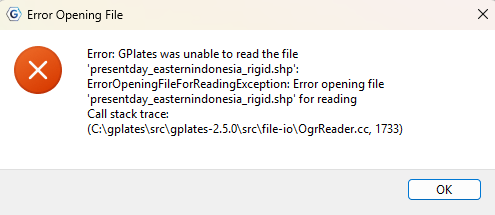
Hi all, I was assigning new plate ID in GPlate from my shapefile. However, I can’t save it in GPlates and just ejected them. When I wanted to reload the original shapefile in QGIS it appeared invalid data source (I assure that the directory is remain valid) which there was no issue at all before. Likewise, when I tried to reload the shapefile to GPlate, it gave me error message like that.
Does anyone have an idea on this issue?
I’d appreciate your answers.
there’s a few critical things missing in your post such as operating system, where the files are located (network drive, local disk) etc that are necessary to provide useful advice and get to the bottom of whether this is a user error or a bug.
From my own experience on Windoze (based on the screenshot), file corruption happens if you have the file open in two applications (e.g. QGIS and GPlates) and you try and modify it in one of them. PowerToys’ File Locksmith can help to check which process accesses the file in question.
The other option is that if files are located on a network drive then GPlates is a bit picky when network connections have changed and you kept the GPlates project open - in this case make sure the file(s) are saved locally and try again.
Also, unless you really depend on ESRI Shapefiles, please ditch them in favour of the OGC-standardised, open format successor, the Geopackage which GPlates and QGIS happily read.
Your advices are sharp and very helpful. The case was your first paragraph, but other options I shall take into accounts. I needed to redo what I’ve done to get them back though.
Thanks for the tricks!