# Work with opologies
**URL:** https://discourse.gplates.org/t/work-with-opologies/194
**Category:** Q&A
**Created:** [30 September 2020 15:03 UTC](https://discourse.gplates.org/t/work-with-opologies/194 "2020-09-30T15:03:38Z")
**Posts on this page:** 1
**Showing post:** 3
### Author:  [@john.cannon](https://discourse.gplates.org/u/john.cannon)
#### Post date: [2 October 2020 04:40 UTC](https://discourse.gplates.org/t/work-with-opologies/194/3 "2020-10-02T04:40:15Z")
Hi Fabrice,
Thanks for sending your test files.
The problem may be that your `Feature_Line.shp`, which you are using to build your topological polygon, has a Shapefile mapping that does not map _feature IDs_. As a result, when you load your Shapefile back in again, the original feature IDs are not retained and so the topological polygon cannot find any of its boundary references (and hence the topology is not visible).
In other words, if I open the `Feature_Lines.shp.gplates.xml` file I see:
```
APPEARANCE
DISAPPEARA
NAME
PLATE_CODE
```
…which is missing a `FEATURE_ID` line. For example, the standard default mapping looks like:
```
FROMAGE
PLATEID2
DESCR
TOAGE
FEATURE_ID
GPGIM_TYPE
IMPORT_AGE
L_PLATE
NAME
RECON_METH
PLATEID1
R_PLATE
SPREAD_ASY
```
What you can do is simply save your Shapefile from _within GPlates_ (see image below) **before** building any topologies that reference features in that Shapfile. In other words, load your Shapefile into GPlates (which has presumably never been loaded into GPlates before) and immediately save it. This will add the missing mapping fields above, ensuring that feature IDs will get saved as extra attributes into the Shapefile. Alternatively click the `configure` button to the left of the `save` button (in image below) and click `OK`, then save Shapefile.
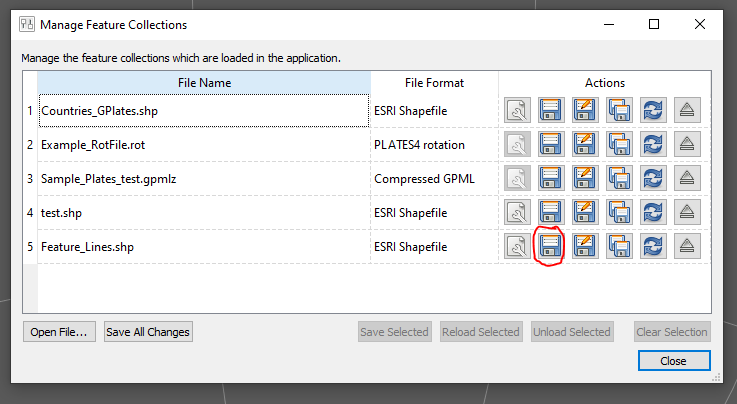
Unfortunately it does mean you’ll need to re-build your topologies. This is because, unless you save your Shapefile using GPlates as mentioned above, every time you load the Shapefile (into GPlates) its features will get assigned new feature IDs (and your existing topologies will be referencing old feature IDs that are now lost).
In general I’d recommend working with GPML(Z) files exclusively when dealing with topologies and their referenced features (although I realize this can be difficult) to avoid issues like this - which includes things like potentially losing the feature ID attribute when manipulating the Shapefile outside GPlates. This is another area we hope to improve on a little bit when we re-structure the GPlates information model to Shapefile mapping (well, not just mapping to Shapefiles, but also other non-native formats).
Regards,
John
---
_[View the full topic](https://discourse.gplates.org/t/work-with-opologies/194)._