# Unable to Adjust Plates In Gplates 2.3.0
**URL:** https://discourse.gplates.org/t/unable-to-adjust-plates-in-gplates-2-3-0/706
**Category:** Q&A
**Created:** [10 July 2023 07:47 UTC](https://discourse.gplates.org/t/unable-to-adjust-plates-in-gplates-2-3-0/706 "2023-07-10T07:47:22Z")
**Posts on this page:** 14
**Page:** 1
### Author:  [@Gplates](https://discourse.gplates.org/u/Gplates)
#### Post date: [10 July 2023 07:47 UTC](https://discourse.gplates.org/t/unable-to-adjust-plates-in-gplates-2-3-0/706/1 "2023-07-10T07:47:23Z")
Hello, I am new to the community so I apologize for the format and if this question has been asked before.
I am having issues moving my plates around in Gplates.
To be specific, when I select a plate/object and move it around the globe, I am only able to move the plate once, as any other movements are seemingly unregistered once I press ‘apply’. This problem seems to occur after I open the Kinematics Table, although I am unsure how they are related and I completely close the Kinematics Table before moving any plates again.
I have checked my .ROT file and it is correct to my knowledge and I have no odd settings enabled.
See attached image for a better understanding of my issue.
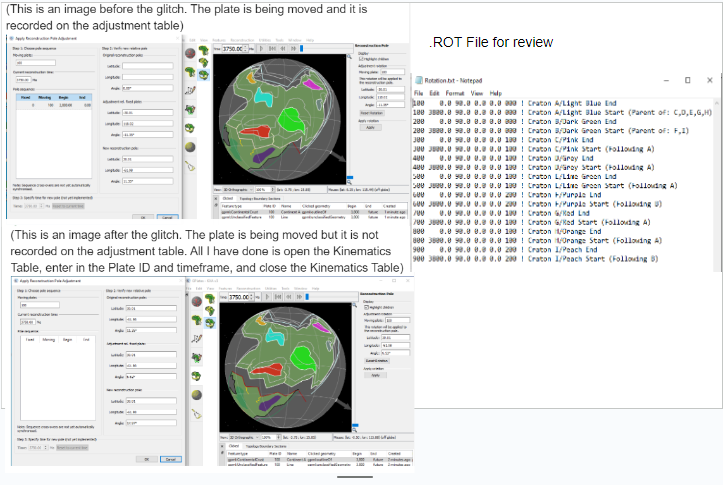
Any help is greatly appreciated!
---
### Author:  [@john.cannon](https://discourse.gplates.org/u/john.cannon)
#### Post date: [11 July 2023 05:25 UTC](https://discourse.gplates.org/t/unable-to-adjust-plates-in-gplates-2-3-0/706/2 "2023-07-11T05:25:57Z")
So it sounds you move a plate then click first `Apply` (and then `OK`) and it works works fine. But repeating that does not.
It might be something to do with the rotations - I vaguely recall this happening to me before - although trying it now seemed to work fine. Also I can’t quite see the text in your screenshot.
---
### Author:  [@Gplates](https://discourse.gplates.org/u/Gplates)
#### Post date: [11 July 2023 18:28 UTC](https://discourse.gplates.org/t/unable-to-adjust-plates-in-gplates-2-3-0/706/3 "2023-07-11T18:28:05Z")
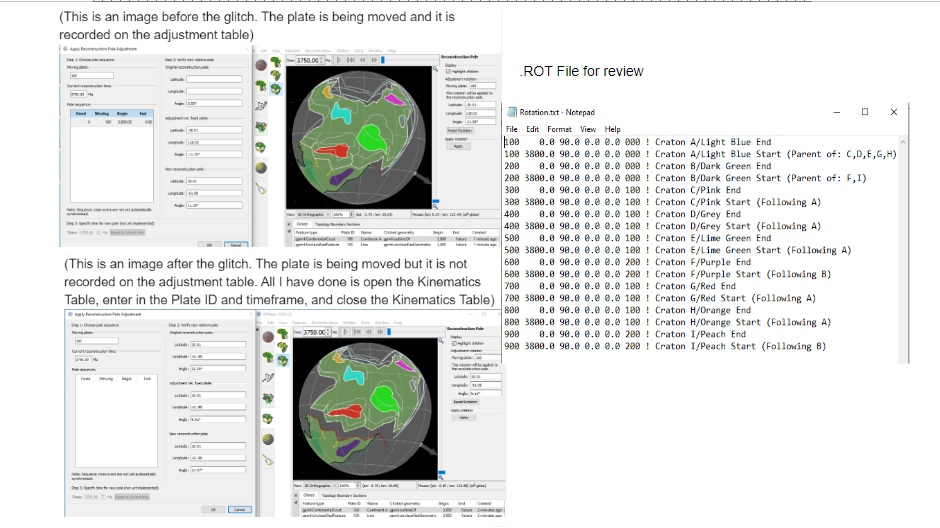
Yes that is exactly my issue. Did you do anything specific when it occurred to you or did you simply close the program and wait?
Sorry, here’s a clearer image.
---
### Author:  [@john.cannon](https://discourse.gplates.org/u/john.cannon)
#### Post date: [12 July 2023 04:06 UTC](https://discourse.gplates.org/t/unable-to-adjust-plates-in-gplates-2-3-0/706/4 "2023-07-12T04:06:58Z")
It happened to me many years ago - but I wasn’t using the Kinematics Tool - I vaguely recall that I was trying to manipulate at a time outside the time range of the rotation file. But that doesn’t seem to be the case for you.
Does it happen always happen or only when using the Kinematics Tool? If you want to PM me your files I can take a look.
---
### Author:  [@Gplates](https://discourse.gplates.org/u/Gplates)
#### Post date: [12 July 2023 04:32 UTC](https://discourse.gplates.org/t/unable-to-adjust-plates-in-gplates-2-3-0/706/5 "2023-07-12T04:32:52Z")
The issue occurs after I use the Kinematics Tool. I have since noticed that imputing the Plate ID and Beginning Time Stamp does not activate the issue. The issue only occurs when I press the ‘Update’ bar to update the table at the bottom of the Kinematics Tool. Once the issue happens it persists and affects all objects.
I would like share my Gplates files. How exactly would I PM my files to you?
---
### Author:  [@john.cannon](https://discourse.gplates.org/u/john.cannon)
#### Post date: [12 July 2023 05:06 UTC](https://discourse.gplates.org/t/unable-to-adjust-plates-in-gplates-2-3-0/706/6 "2023-07-12T05:06:05Z")
> [@Gplates](#):
>
> I would like share my Gplates files. How exactly would I PM my files to you?
Ah yes, it seems the upload file types are limited when sending a Personal Message (by clicking on someone’s icon then clicking `Message`). Instead I’ve just sent you an email that you can reply to.
---
### Author:  [@Gplates](https://discourse.gplates.org/u/Gplates)
#### Post date: [12 July 2023 06:29 UTC](https://discourse.gplates.org/t/unable-to-adjust-plates-in-gplates-2-3-0/706/7 "2023-07-12T06:29:46Z")
Apologies, I am new to Gplates and this Community. Just for clarification, what exactly do I send you? How do I access Gplates Files and send them to you?
---
### Author:  [@john.cannon](https://discourse.gplates.org/u/john.cannon)
#### Post date: [12 July 2023 06:47 UTC](https://discourse.gplates.org/t/unable-to-adjust-plates-in-gplates-2-3-0/706/8 "2023-07-12T06:47:31Z")
Just the files that you loaded into GPlates. It looks like you have a `.rot` file, and you have some plates that are probably in one or more `.gpml` files (or Shapefiles). If you can zip them all up and attach that zip file when replying to my regular email (not PM) that I sent (hopefully it got through any spam filters), that’d be great, thanks.
---
### Author:  [@Gplates](https://discourse.gplates.org/u/Gplates)
#### Post date: [12 July 2023 23:22 UTC](https://discourse.gplates.org/t/unable-to-adjust-plates-in-gplates-2-3-0/706/9 "2023-07-12T23:22:58Z")
I have sent you the zipped files.
---
### Author:  [@john.cannon](https://discourse.gplates.org/u/john.cannon)
#### Post date: [13 July 2023 05:45 UTC](https://discourse.gplates.org/t/unable-to-adjust-plates-in-gplates-2-3-0/706/10 "2023-07-13T05:45:06Z")
Thanks for sending those files. It’s actually a bug in GPlates - I’ve just fixed that now. You can download `gplates_2.3.1-beta.7_win64.zip` [here](https://cloudstor.aarnet.edu.au/plus/s/ojsYNOyUYE3evNp).
Your workflow exposed the bug because you have such a large time range going back to 3800 Ma. And so, in the Kinematics Tool, there were greater than 512 reconstruction times in the graph (ie, `(3800 - 0) / 5Myr`). The number 512 is a general internal limit (not specific to the Kinematics Tool) that we use to ensure good reconstruction performance in most use cases (without using too much memory).
---
### Author:  [@Gplates](https://discourse.gplates.org/u/Gplates)
#### Post date: [13 July 2023 06:26 UTC](https://discourse.gplates.org/t/unable-to-adjust-plates-in-gplates-2-3-0/706/11 "2023-07-13T06:26:08Z")
Ah, that explains it. Thank you so much for your help! I really appreciate it!
I’m assuming I need to unzip the files once downloaded and that will fix the issue?
---
### Author:  [@john.cannon](https://discourse.gplates.org/u/john.cannon)
#### Post date: [13 July 2023 06:43 UTC](https://discourse.gplates.org/t/unable-to-adjust-plates-in-gplates-2-3-0/706/12 "2023-07-13T06:43:08Z")
Yes that’s correct. Then double-click `gplates.exe` to start the version of GPlates containing the fix. Also that build does not contain the geodata, but you can access the geodata that came with your regular GPlates 2.3 installation (not that you’ll need it though).
---
### Author:  [@Gplates](https://discourse.gplates.org/u/Gplates)
#### Post date: [13 July 2023 06:49 UTC](https://discourse.gplates.org/t/unable-to-adjust-plates-in-gplates-2-3-0/706/13 "2023-07-13T06:49:23Z")
Thank you so much for your help!
One more question: When I run gplates.exe, I’m assuming I load the current project rather the original. Where/how exactly do I save the new current project? Do I need to do anything specific?
---
### Author:  [@john.cannon](https://discourse.gplates.org/u/john.cannon)
#### Post date: [24 July 2023 02:08 UTC](https://discourse.gplates.org/t/unable-to-adjust-plates-in-gplates-2-3-0/706/14 "2023-07-24T02:08:50Z")
Saving a project will overwrite the `.gproj` file that you loaded the project from. But you can save your current session [to a different project file](https://www.gplates.org/docs/user-manual/Projects_and_Recent_Sessions/#8-saving-a-project) with `File > Save Project As`.