# Tutorial 7.1 Volume Visualization
**URL:** https://discourse.gplates.org/t/tutorial-7-1-volume-visualization/812
**Category:** Q&A
**Created:** [8 January 2024 23:17 UTC](https://discourse.gplates.org/t/tutorial-7-1-volume-visualization/812 "2024-01-08T23:17:42Z")
**Posts on this page:** 3
**Page:** 1
### Author:  [@Leslie](https://discourse.gplates.org/u/Leslie)
#### Post date: [8 January 2024 23:17 UTC](https://discourse.gplates.org/t/tutorial-7-1-volume-visualization/812/1 "2024-01-08T23:17:42Z")
Hello! I’m having issues with developing tutorial 7.1 “Volume Visualization.” First, when I import the 3D data, I can’t move the globe. And when I proceed with the settings for exercise 2, I don’t see any changes until part 3. In part 4, it’s required to load the file Matthews\_etal\_GPC\_inrev\_MesozoicCenozoic\_PlateTopologies; however, it doesn’t appear among the downloaded files. I hope you can guide me, thanks!
---
### Author:  [@john.cannon](https://discourse.gplates.org/u/john.cannon)
#### Post date: [15 January 2024 04:41 UTC](https://discourse.gplates.org/t/tutorial-7-1-volume-visualization/812/2 "2024-01-15T04:41:39Z")
> [@Leslie](#):
>
> First, when I import the 3D data, I can’t move the globe.
What OS and GPlates version are you using?
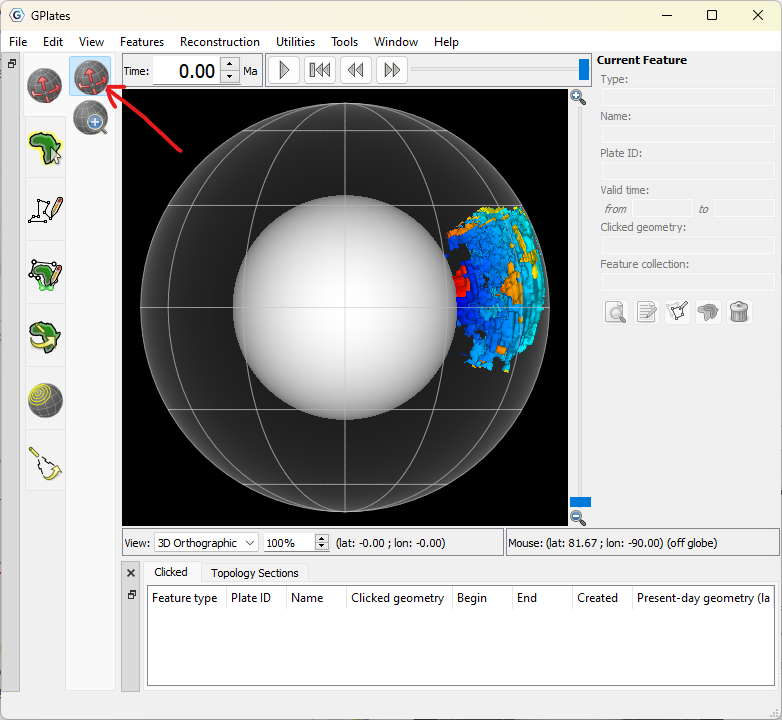
When you first import it should look like this - and you should be able to drag the globe provided you’re in the `Drag Globe` tool (see red arrow below)…
> [@Leslie](#):
>
> In part 4, it’s required to load the file Matthews\_etal\_GPC\_inrev\_MesozoicCenozoic\_PlateTopologies; however, it doesn’t appear among the downloaded files.
It’s actually in the GeoData that comes with the GPlates installers (ie, it’s not in the tutorial data). The tutorial mentions `GPlates Sample Data → Feature Collections → Dynamic Polygons` - so you can just load whatever GPML files are in that folder (eg, on Windows it’ll be something like `C:\Program Files\GPlates\GPlates 2.4.0\GeoData\FeatureCollections\DynamicPolygons`).
---
### Author:  [@Leslie](https://discourse.gplates.org/u/Leslie)
#### Post date: [22 January 2024 21:09 UTC](https://discourse.gplates.org/t/tutorial-7-1-volume-visualization/812/3 "2024-01-22T21:09:18Z")
Hi! thank you for your reply. The operating system is Windows 11, and I am using version 2.4.0.