# PyGPlates Installation error on Ubuntu 20.04
**URL:** https://discourse.gplates.org/t/pygplates-installation-error-on-ubuntu-20-04/483
**Category:** Bug Reports
**Created:** [23 February 2022 10:29 UTC](https://discourse.gplates.org/t/pygplates-installation-error-on-ubuntu-20-04/483 "2022-02-23T10:29:04Z")
**Posts on this page:** 20
**Page:** 1
### Author:  [@B92](https://discourse.gplates.org/u/B92)
#### Post date: [23 February 2022 10:29 UTC](https://discourse.gplates.org/t/pygplates-installation-error-on-ubuntu-20-04/483/1 "2022-02-23T10:29:04Z")
Hi, I’m trying to install PyGPlates on Ubuntu 20.04 and have followed all of the instructions in the readme files. I have checked and all dependencies are installed and I am able to build the pygplates.so image. However, when I try and import the module I get the error: “segmentation fault (core dumped)”. Does anyone know how to solve this?
Thanks!
---
### Author:  [@john.cannon](https://discourse.gplates.org/u/john.cannon)
#### Post date: [23 February 2022 11:12 UTC](https://discourse.gplates.org/t/pygplates-installation-error-on-ubuntu-20-04/483/2 "2022-02-23T11:12:21Z")
Hi Bhavik,
It might be easier to install the [Focal `.deb` package](https://sourceforge.net/projects/gplates/files/pygplates/beta-revision-28/ubuntu/), rather than building from source code.
I’m guessing you get the error when you `import pygplates`. Is there any error message before it seg faults?
---
### Author:  [@B92](https://discourse.gplates.org/u/B92)
#### Post date: [25 February 2022 00:00 UTC](https://discourse.gplates.org/t/pygplates-installation-error-on-ubuntu-20-04/483/3 "2022-02-25T00:00:10Z")
Hi John, thanks for the reply. I installed pygplates using the focal.deb package that you recommended, and set the correct PYTHONPATH environment variable. However, when I try and import the module, I still get the same error “Segmentation fault (core dumped)”. It seems whichever way pygplates is installed, this error keeps occurring when I try and import the module on my system.
---
### Author:  [@john.cannon](https://discourse.gplates.org/u/john.cannon)
#### Post date: [27 February 2022 02:42 UTC](https://discourse.gplates.org/t/pygplates-installation-error-on-ubuntu-20-04/483/4 "2022-02-27T02:42:23Z")
It could be an issue with one of your dependencies. On my Focal I installed the focal `.deb` and ran the following with no issues:
```python
export PYTHONPATH=/usr/lib/pygplates/revision28
python3 -c "import pygplates; print(pygplates. __version__ )"
```
You mentioned previously not having the correct version of GDAL installed. I’ve only ever installed the system default versions (eg, using `sudo apt install libgdal-dev`). Maybe try installing the default version of `boost` (if you installed a different version) because I know that different platforms have had issues with seg faulting related to boost (ie, pygplates might not segfault on one OS/library version but will on another).
---
### Author:  [@B92](https://discourse.gplates.org/u/B92)
#### Post date: [28 February 2022 01:38 UTC](https://discourse.gplates.org/t/pygplates-installation-error-on-ubuntu-20-04/483/5 "2022-02-28T01:38:57Z")
Hi, I have installed the correct versions of both libgdal-dev and boost and re-installed pygplates-py3 from Focal, however still cannot get past the same error of “Segmentation fault (core dumped)”. When I run the command that you have suggested, I get:
> > python3 -c “import pygplates; print(pygplates. **version** )”
> > 2.2.0.28
> > Segmentation fault (core dumped)
I have also noticed something else strange, when I import the pygmt module I get no errors. However, if I import this after importing pygplates, I get errors. This does not occur with any other module. I have included this below:
Importing pygmt by itself:
> > python3 -c “import pygmt”
Importing pygmt before pygplates:
> > python3 -c “import pygmt; import pygplates”
> > Segmentation fault (core dumped)
importing pygmt after pygplates:
> > python3 -c “import pygplates; import pygmt”
> > Traceback (most recent call last):
> > File “”, line 1, in
> > File “/home/bhavik/anaconda3/envs/kinpy\_forward/lib/python3.9/site-packages/pygmt/ **init**.py”, line 70, in
> > \_begin()
> > File “/home/bhavik/anaconda3/envs/kinpy\_forward/lib/python3.9/site-packages/pygmt/session\_management.py”, line 16, in begin
> > with Session() as lib:
> > File “/home/bhavik/anaconda3/envs/kinpy\_forward/lib/python3.9/site-packages/pygmt/clib/session.py”, line 183, in **enter**
> > self.create(“pygmt-session”)
> > File “/home/bhavik/anaconda3/envs/kinpy\_forward/lib/python3.9/site-packages/pygmt/clib/session.py”, line 329, in create
> > c\_create\_session = self.get\_libgmt\_func(
> > File “/home/bhavik/anaconda3/envs/kinpy\_forward/lib/python3.9/site-packages/pygmt/clib/session.py”, line 281, in get\_libgmt\_func
> > self.\_libgmt = load\_libgmt()
> > File “/home/bhavik/anaconda3/envs/kinpy\_forward/lib/python3.9/site-packages/pygmt/clib/loading.py”, line 59, in load\_libgmt
> > raise GMTCLibNotFoundError(“\n”.join(error\_msg))
> > pygmt.exceptions.GMTCLibNotFoundError: Error loading GMT shared library at ‘/home/bhavik/anaconda3/envs/pygmt/lib/libgmt.so’.
> > /home/bhavik/anaconda3/envs/pygmt/lib/./libgdal.so.29: undefined symbol: opj\_encoder\_set\_extra\_options
> > Error loading GMT shared library at ‘libgmt.so’.
> > libgmt.so: cannot open shared object file: No such file or directory
> > Segmentation fault (core dumped)
I do not know why importing pygplates causes errors with pygmt, as it is not a dependency. However, I have included the information in case you have seen this issue before.
---
### Author:  [@john.cannon](https://discourse.gplates.org/u/john.cannon)
#### Post date: [28 February 2022 03:26 UTC](https://discourse.gplates.org/t/pygplates-installation-error-on-ubuntu-20-04/483/6 "2022-02-28T03:26:36Z")
It looks like conflicting GDAL library versions. Since you’re using Anaconda the GDAL version built inside Anaconda is being used (`/home/bhavik/anaconda3/envs/pygmt/lib/libgdal.so`). However pygplates is compiled against the system GDAL (installed by `sudo apt install libgdal-dev`).
Try using the system version of `python3` when running `python3 -c "import pygplates"` and see it if still seg faults. In other words don’t run that command within an Anaconda environment.
In the next release we plan to have an Anaconda version of pygplates, which should avoid this sort of problem.
---
### Author:  [@B92](https://discourse.gplates.org/u/B92)
#### Post date: [28 February 2022 04:32 UTC](https://discourse.gplates.org/t/pygplates-installation-error-on-ubuntu-20-04/483/7 "2022-02-28T04:32:54Z")
Hi John,
When I try and import pygplates from the base environment I get the following:
> > python3 -c “import pygplates”
> > Traceback (most recent call last)
> > File “”, line 1, in
> > ImportError: /home/bhavik/anaconda3/bin…/lib/libQt5Core.so.5: version `Qt\_5.12’ not found (required by usr/lib/pygplates/revision28/pygplates.so)
I guess this is the same problem, the anaconda Qt5 library is being loaded when pygplates needs the system version. I have the system versions of both GDAL QT5 installed, do you know how I can make pygplates use these versions instead of the anaconda versions? I have tried setting the environment variables but this doesn’t seem to work
---
### Author:  [@john.cannon](https://discourse.gplates.org/u/john.cannon)
#### Post date: [28 February 2022 07:48 UTC](https://discourse.gplates.org/t/pygplates-installation-error-on-ubuntu-20-04/483/8 "2022-02-28T07:48:26Z")
I forgot to mention that conda usually activates the _base_ environment by default. So it’s just another conda environment. Try running `conda deactivate` before running `python3 -c "import pygplates"`. There’s also mention [here](http://progsharing.blogspot.com/2019/07/deactivate-condas-base-environment-on.html) how to prevent activating the base environment by default. So this is really just to test if pygplates works outside of conda.
---
### Author:  [@john.cannon](https://discourse.gplates.org/u/john.cannon)
#### Post date: [1 March 2022 06:23 UTC](https://discourse.gplates.org/t/pygplates-installation-error-on-ubuntu-20-04/483/9 "2022-03-01T06:23:49Z")
> When I deactivate the base environment and try and import pygplates, I get the following:
>
> Traceback (most recent call last):
> File “”, line 1, in
> ImportError: libboost\_program\_options.so.1.72.0: cannot open shared object file: No such file or directory
>
> So it seems to be different dependency issues no matter the conda environment or if not in a conda environment.
Hmm, not sure why that’s happening. Also my Ubuntu 20.04 uses boost 1.71 (and yours is looking for 1.72).
In any case, I think you’re wanting to use pygplates in a conda environment (so you can use conda packages at the same time) so the best bet for now is to compile pygplates using the dependencies in your conda environment. You can do that by following the instructions in [this thread](https://discourse.gplates.org/t/cmake-error-while-installing-pygplates/351). In particular you can start with [this post](https://discourse.gplates.org/t/cmake-error-while-installing-pygplates/351/3) but also use conda’s cmake (mentioned in [this post](https://discourse.gplates.org/t/cmake-error-while-installing-pygplates/351/14)) and apply the patches mentioned in [this post](https://discourse.gplates.org/t/cmake-error-while-installing-pygplates/351/17).
That should hopefully gets things working for you until the next pygplates release in the coming months (which will support conda).
---
### Author:  [@B92](https://discourse.gplates.org/u/B92)
#### Post date: [7 March 2022 02:49 UTC](https://discourse.gplates.org/t/pygplates-installation-error-on-ubuntu-20-04/483/10 "2022-03-07T02:49:57Z")
Hi John
So I followed all the instructions, including installing the dependencies into a new conda env, using conda cmake and making the changes to the cmake files etc. The installation runs without any errors and all paths are correct. However, the “Segmentation fault (core dumped)” error still comes no matter what I do…
---
### Author:  [@john.cannon](https://discourse.gplates.org/u/john.cannon)
#### Post date: [7 March 2022 03:08 UTC](https://discourse.gplates.org/t/pygplates-installation-error-on-ubuntu-20-04/483/11 "2022-03-07T03:08:10Z")
Nice job compiling for conda. Can you PM me your CMakeCache.txt file? I just want to double-check that it’s using only conda dependencies (in particular GDAL, which is causing the seg fault).
---
### Author:  [@john.cannon](https://discourse.gplates.org/u/john.cannon)
#### Post date: [7 March 2022 04:47 UTC](https://discourse.gplates.org/t/pygplates-installation-error-on-ubuntu-20-04/483/12 "2022-03-07T04:47:29Z")
Thanks for sending the `CMakeCache.txt` file.
As we discussed offline just now, your initial seg fault is now fixed (the problem mentioned in [this post above](https://discourse.gplates.org/t/pygplates-installation-error-on-ubuntu-20-04/483/5): `libgdal.so.29: undefined symbol: opj_encoder_set_extra_options`). By compiling `pygplates` in conda, both `pygplates` and `pygmt` use the same version of GDAL (thus avoiding the conflict).
The problem you’re now having (mentioned in [this post](https://discourse.gplates.org/t/pygplates-installation-error-on-ubuntu-20-04/483/10)) is a different issue that’s covered in [this post](https://discourse.gplates.org/t/python-shell-segmentation-fault-after-exiting-when-importing-pygplates/487/2): it’s an issue with `pygplates` seg faulting _on exit_ when using version 3.9 of Python that I’m currently looking into.
So now you’re compiling pygplates in a Python _3.8_ (not 3.9) conda environment as a workaround.
---
### Author:  [@B92](https://discourse.gplates.org/u/B92)
#### Post date: [11 March 2022 00:57 UTC](https://discourse.gplates.org/t/pygplates-installation-error-on-ubuntu-20-04/483/13 "2022-03-11T00:57:35Z")
Hi John,
So I created an anaconda environment with Python 3.8 and followed all of the instructions, editing the build files etc to make sure the correct version of GDAL is found. The build and installation ran without any errors, however when trying to import pygplates the following error comes up:
> > ImportError: libboost\_python39.so.1.72.0: cannot open shared object file: No such file or directory
The file libboost\_python39.so.1.72.0 does not exist, but the file libboost\_python38.so.1.72.0 does exist and is installed in the same environment (called pygplates\_py38) used for the build and installation, so I don’t know why the path is being directed elsewhere…
---
### Author:  [@john.cannon](https://discourse.gplates.org/u/john.cannon)
#### Post date: [11 March 2022 02:24 UTC](https://discourse.gplates.org/t/pygplates-installation-error-on-ubuntu-20-04/483/14 "2022-03-11T02:24:39Z")
It’s probably a leftover reference from your previous pygplates build in the Python 3.9 environment (if you’re building from the same pygplates source code directory for your Python 3.8 environment).
You can try removing the `CMakeCache.txt` file (as that caches all the build references, like `libboost_python39.so.1.72.0`). And then run `'cmake .'` again. Then you can then double-check that the new `CMakeCache.txt` file no longer references Python 3.9 in any way. Then run `make`. That should compile quite quickly.
If that doesn’t work then try removing the entire pygplates source directory altogether (this should also remove your build artefacts if you built in the same directory, eg, with `'cmake .'`). Then extract the source code again and repeat the build (run `'cmake .'` followed by `make`). This will compile slowly (since it’s a full rebuild).
---
### Author:  [@B92](https://discourse.gplates.org/u/B92)
#### Post date: [11 March 2022 11:03 UTC](https://discourse.gplates.org/t/pygplates-installation-error-on-ubuntu-20-04/483/15 "2022-03-11T11:03:29Z")
Hi John, I deleted the CMakeCache.txt file and the entire pygplates source directory and ran all the steps described in previous comments, using Python 3.8. However, the “Segmentation fault (core dumped)” error is still occurring…
---
### Author:  [@john.cannon](https://discourse.gplates.org/u/john.cannon)
#### Post date: [11 March 2022 11:34 UTC](https://discourse.gplates.org/t/pygplates-installation-error-on-ubuntu-20-04/483/16 "2022-03-11T11:34:17Z")
Is it seg fault happening on exit ? (just wondering which of the two seg faults mentioned in [this post](https://discourse.gplates.org/t/pygplates-installation-error-on-ubuntu-20-04/483/12)).
Also perhaps double-check that there’s no reference to Python 3.9 in the `CMakeCache.txt` file.
---
### Author:  [@john.cannon](https://discourse.gplates.org/u/john.cannon)
#### Post date: [22 March 2022 10:51 UTC](https://discourse.gplates.org/t/pygplates-installation-error-on-ubuntu-20-04/483/17 "2022-03-22T10:51:55Z")
It might be worth trying the new pyGPlates 0.35 source code mentioned in [this post](https://discourse.gplates.org/t/python-shell-segmentation-fault-after-exiting-when-importing-pygplates/487/5).
It fixes the seg fault on exit for Python 3.9 (but might also fix your Python 3.8 issue, if it’s the same problem, although I’ve only heard of this particular _seg-fault-on-exit_ problem happening with Python 3.9).
---
### Author:  [@victorcarreira](https://discourse.gplates.org/u/victorcarreira)
#### Post date: [13 October 2022 17:56 UTC](https://discourse.gplates.org/t/pygplates-installation-error-on-ubuntu-20-04/483/18 "2022-10-13T17:56:23Z")
I have successfully installed pygplates in my Ubuntu 20.4 LTS. `
But when i run a script test the it returns that there is no pygplates installed in my PC.
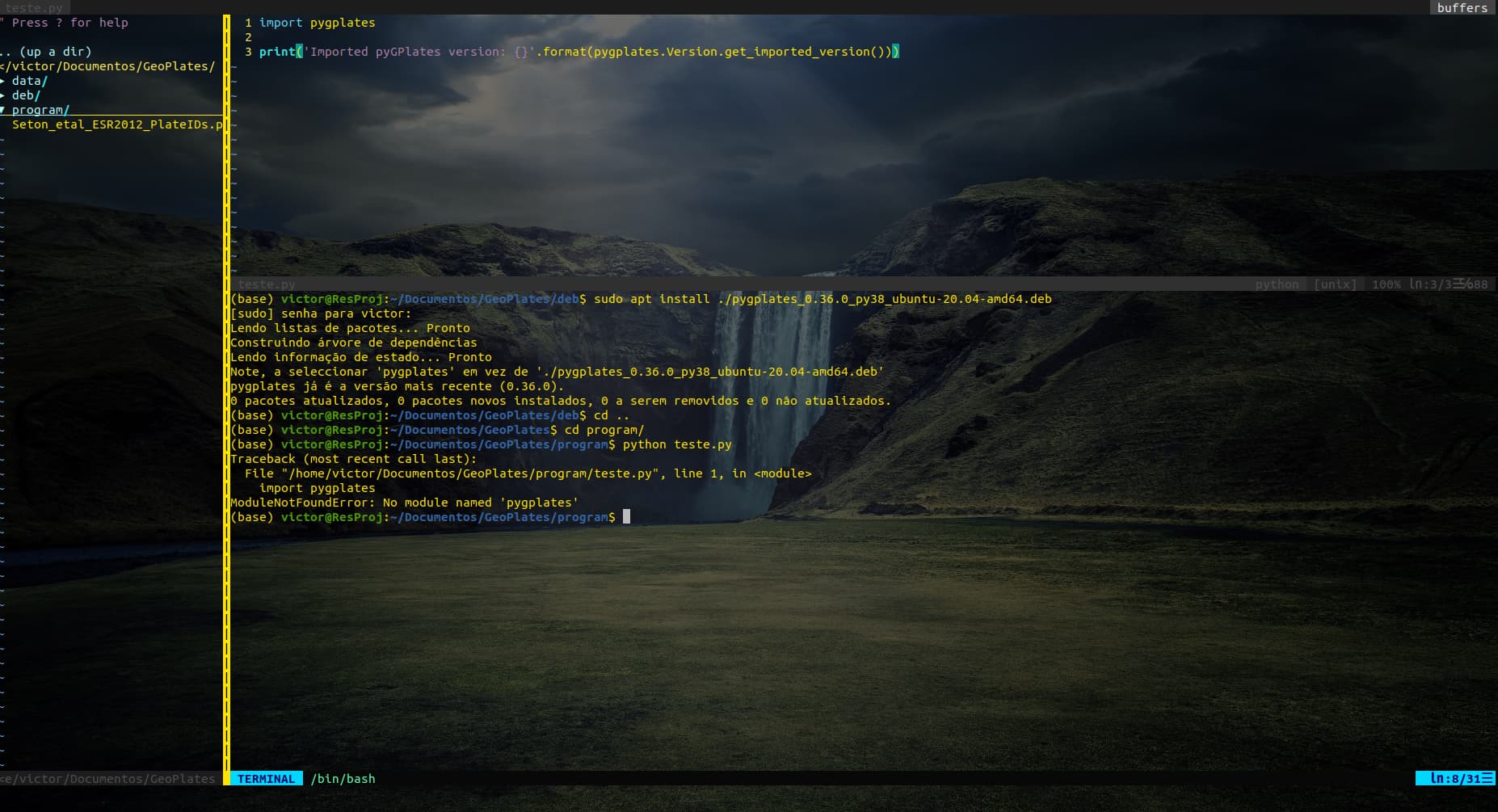
How can i do it work?
---
### Author:  [@john.cannon](https://discourse.gplates.org/u/john.cannon)
#### Post date: [14 October 2022 05:40 UTC](https://discourse.gplates.org/t/pygplates-installation-error-on-ubuntu-20-04/483/19 "2022-10-14T05:40:48Z")
Hi Victor,
You also need to tell Python where to find pyGPlates, as covered in the [installation instructions for Ubuntu](https://www.gplates.org/docs/pygplates/pygplates_getting_started.html#pre-compiled-for-ubuntu):
```auto
export PYTHONPATH=$PYTHONPATH:/usr/lib
```
---
### Author:  [@victorcarreira](https://discourse.gplates.org/u/victorcarreira)
#### Post date: [7 December 2022 17:14 UTC](https://discourse.gplates.org/t/pygplates-installation-error-on-ubuntu-20-04/483/20 "2022-12-07T17:14:55Z")
Thanks for the feedback, John. I did but an error lies in another library now.
ImportError: /lib/x86\_64-linux-gnu/libp11-kit.so.0: undefined symbol: ffi\_type\_pointer, version LIBFFI\_BASE\_7.0
Do you have any idea about why this problem happens?

[Next page](https://discourse.gplates.org/t/pygplates-installation-error-on-ubuntu-20-04/483.md?page=2)