# Problem with ocean crusts
**URL:** https://discourse.gplates.org/t/problem-with-ocean-crusts/932
**Category:** Worldbuilding
**Created:** [20 July 2024 20:21 UTC](https://discourse.gplates.org/t/problem-with-ocean-crusts/932 "2024-07-20T20:21:44Z")
**Posts on this page:** 6
**Page:** 1
### Author:  [@MrUks](https://discourse.gplates.org/u/MrUks)
#### Post date: [20 July 2024 20:21 UTC](https://discourse.gplates.org/t/problem-with-ocean-crusts/932/1 "2024-07-20T20:21:44Z")
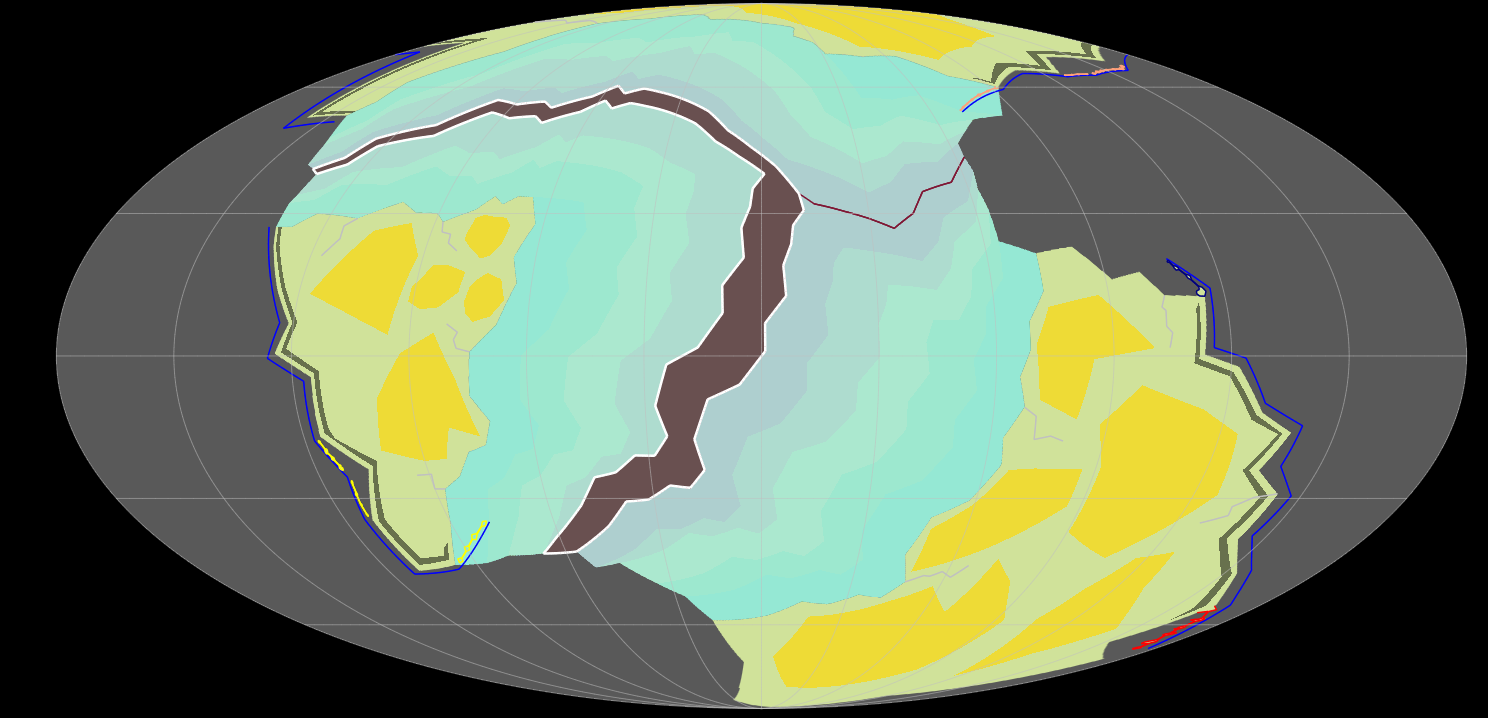
Hi everyone, I’m working on my world’s map (based on the tutorials from artifaxian and worldbuilding pasta) and have been stumped by this. I’ve created an oceancrust, but unlike the other ones, it doesn’t seem to become blue even after rebooting gplates or trying to create an alternative project using the same files. Here’s a pic. I’ve selected the oceanic crust. I’ve checked: correct craton, no duplicate coordinates, belongs to oceancrusts file, the other 2 of the same era are fine, it starts at the correct time, just like the other 2 from that era. Anyone any other ideas?
also, just to note, as visible: it clearly exists and is getting a color, just not the ocean raster.
---
### Author:  [@MrUks](https://discourse.gplates.org/u/MrUks)
#### Post date: [21 July 2024 22:25 UTC](https://discourse.gplates.org/t/problem-with-ocean-crusts/932/2 "2024-07-21T22:25:07Z")
NOTE: I have located that for some reason it’s the last coordinate, located on the top left side, but no idea why having a coordinate there would cause the glitch
---
### Author:  [@nickallanj](https://discourse.gplates.org/u/nickallanj)
#### Post date: [31 July 2024 07:22 UTC](https://discourse.gplates.org/t/problem-with-ocean-crusts/932/3 "2024-07-31T07:22:49Z")
It’s either the beginning time being too far in the past, or it’s in a different feature collection from the rest of them and isn’t following the same coloring rules.
Sorry for the pretty late reply to this
---
### Author:  [@MrUks](https://discourse.gplates.org/u/MrUks)
#### Post date: [1 August 2024 12:26 UTC](https://discourse.gplates.org/t/problem-with-ocean-crusts/932/4 "2024-08-01T12:26:05Z")
Hi,
Thanks for he answer, sadly enough it seems to be more complex than that. It’s in the correct collection as it does get the age colours like all other ocean crusts get.
It is also the correct time as it appears when it should. It’s specifically the ocean raster I’m using to colour it with a blue hue in the background.
I’ve tried many different options and it seems like when I change the coordinate at the top left, for some reason that gets the colour. I have no clue why.
To make it stranger: every ocean crust coming after that one on that specific plate has the same issue and they all seem to get resolved if I move there last coordinate or simply delete it, but why or how that’s happening, I have no idea why or what I did wrong but this seems to be a very specific and strange issue.
---
### Author:  [@nickallanj](https://discourse.gplates.org/u/nickallanj)
#### Post date: [4 August 2024 23:56 UTC](https://discourse.gplates.org/t/problem-with-ocean-crusts/932/5 "2024-08-04T23:56:18Z")
It seems like the issue is coming from the method you’re using to color them. I’m unfamiliar with using rasters for this sort of thing, I would usually use an age-based .cpt file. For example:
```auto
0 244/144/138 5 244/144/138
5 244/144/138 15 221/181/177
15 221/181/177 25 204/153/148
25 204/153/148 50 178/128/123
50 178/128/123 500 129/134/126
```
You can open this in the draw style panel under Feature Age, it’s just a .txt file of the above with the extension changed to .cpt so GPlates can read it. The only thing I’d warn you about with this method is that you have to make sure the topology has the right age, otherwise it’ll look wrong
---
### Author:  [@MrUks](https://discourse.gplates.org/u/MrUks)
#### Post date: [4 September 2024 07:57 UTC](https://discourse.gplates.org/t/problem-with-ocean-crusts/932/6 "2024-09-04T07:57:44Z")
thank you so much. I didn’t know how to write/format a cpt file, so this would be a great workaround 🙂
EDIT:
This is what I have made to replicate the colors I liked:
> 0 179 193 193 50 179 215 193
> 50 179 215 193 100 174 233 193
> 100 174 233 193 150 152 233 193
> 150 152 233 193 200 139 233 201
> 200 139 233 201 250 139 233 224
> 250 139 233 224 300 139 219 233
> 300 139 219 233 350 139 197 233
> 350 139 197 233 400 156 193 233
> 400 156 193 233 1000 179 193 233
I’m fully aware no ocean crust stays active for a billion years, but thought it would be easier to avoid any glitches if I’m debugging or testing things