# Issue starting GPlates
**URL:** https://discourse.gplates.org/t/issue-starting-gplates/710
**Category:** Bug Reports
**Created:** [15 July 2023 10:48 UTC](https://discourse.gplates.org/t/issue-starting-gplates/710 "2023-07-15T10:48:50Z")
**Posts on this page:** 7
**Page:** 1
### Author:  [@saleh](https://discourse.gplates.org/u/saleh)
#### Post date: [15 July 2023 10:48 UTC](https://discourse.gplates.org/t/issue-starting-gplates/710/1 "2023-07-15T10:48:50Z")
I’ve been trying to start GPlates on my Windows machine but I keep getting the attached message and it won’t start.
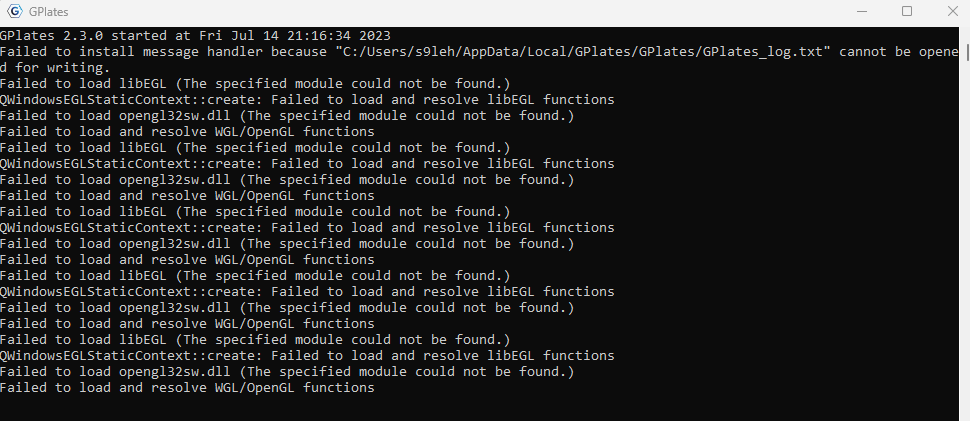
Anyone knows how to fix this? Note that I couldn’t even find the folder in which the log file exists.
Thanks,
Saleh
---
### Author:  [@john.cannon](https://discourse.gplates.org/u/john.cannon)
#### Post date: [17 July 2023 11:28 UTC](https://discourse.gplates.org/t/issue-starting-gplates/710/2 "2023-07-17T11:28:56Z")
Hi Saleh,
It’s basically because your system is using OpenGL 1.1 (instead of OpenGL 2 or above).
Have a look at [this post](https://discourse.gplates.org/t/failed-to-load-and-resolve-wgl-opengl-functions/626). There’s also [this post](https://discourse.gplates.org/t/error-while-launching-gplates-v2-3-0/540) - but it ends up at the same thing (not having/using OpenGL \>= 2.0).
---
### Author:  [@mchin](https://discourse.gplates.org/u/mchin)
#### Post date: [19 July 2023 22:10 UTC](https://discourse.gplates.org/t/issue-starting-gplates/710/3 "2023-07-19T22:10:40Z")
Hi @saleh,
Did John’s answer solve your problem?
---
### Author:  [@saleh](https://discourse.gplates.org/u/saleh)
#### Post date: [21 July 2023 22:13 UTC](https://discourse.gplates.org/t/issue-starting-gplates/710/4 "2023-07-21T22:13:50Z")
Hi John,
Thanks a lot for your response and apologies for not getting back sooner; I’ve been distracted by other things I’m working on and had little time trying out the suggested solution.
The issue is now solved. Here is a brief about my experience, which might help others having similar issues. (in hindsight this looks a bit lengthy- apologies)
Thanks to you, your post you shared gave me a idea where to start. Using your lead on upgrading the graphics driver, I checked the graphics drivers using Device Manager → Display Adapters. There were two: an Intel & a Radeon. I’m really a novice when it comes to the ins and outs of computers so I wasn’t sure what each does - still am for the most part. I tried to update both (RC → Update driver) and was told the best drivers for my device are installed.
After further searching I was guided to check graphics options from System → Display-\> Graphics. There I saw the apps using the graphics drivers (I think) and GPlates wasn’t there. I added it (Desktop app → Browsed to GPlates folder and selected its icon). When GPlates was added an Options ‘option’ showed up beneath it and there you get to select the Graphics preference. It turns out that only when selecting the Radeon (High performing) option that GPlates launches successfully.
Thanks again for your support and hope this can be of use for others.
Best,
Saleh
---
### Author:  [@saleh](https://discourse.gplates.org/u/saleh)
#### Post date: [21 July 2023 22:18 UTC](https://discourse.gplates.org/t/issue-starting-gplates/710/5 "2023-07-21T22:18:02Z")
Hi @mchin,
Yes, it did thanks for following up and to John for his response. Much appreciated.
Saleh
---
### Author:  [@john.cannon](https://discourse.gplates.org/u/john.cannon)
#### Post date: [24 July 2023 02:23 UTC](https://discourse.gplates.org/t/issue-starting-gplates/710/6 "2023-07-24T02:23:40Z")
Hi Saleh,
Thanks for reporting that, and good job solving that.
It does sound like your integrated Intel graphics is either:
1. quite old (eg, Intel GMA) and hence doesn’t support OpenGL 2.0, or
2. there’s something weird happening with its driver (even though it’s reported as the latest).
Switching to your Radeon graphics (which supports OpenGL 2.0) did the trick. Thanks for describing to others how to make the switch for GPlates.
---
### Author:  [@saleh](https://discourse.gplates.org/u/saleh)
#### Post date: [15 August 2023 19:49 UTC](https://discourse.gplates.org/t/issue-starting-gplates/710/7 "2023-08-15T19:49:12Z")
You’re welcome John and thanks to you too.
Saleh