# GPlates problem
**URL:** https://discourse.gplates.org/t/gplates-problem/189
**Category:** Q&A
**Created:** [18 September 2020 23:44 UTC](https://discourse.gplates.org/t/gplates-problem/189 "2020-09-18T23:44:15Z")
**Posts on this page:** 12
**Page:** 1
### Author:  [@yuhang](https://discourse.gplates.org/u/yuhang)
#### Post date: [18 September 2020 23:44 UTC](https://discourse.gplates.org/t/gplates-problem/189/1 "2020-09-18T23:44:15Z")
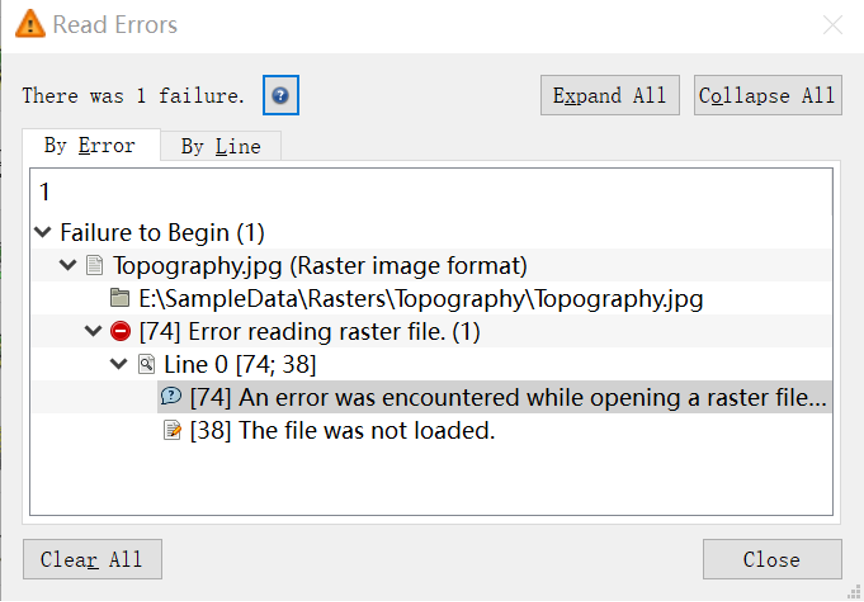
Hi,I don’t know why I can’t open the raster file for some unknown reasons. What is more, I have tried to uninstall it and reinstall it, but it still met the same problem. Some windows like that. Thank you very much.
---
### Author:  [@mchin](https://discourse.gplates.org/u/mchin)
#### Post date: [19 September 2020 01:51 UTC](https://discourse.gplates.org/t/gplates-problem/189/2 "2020-09-19T01:51:19Z")
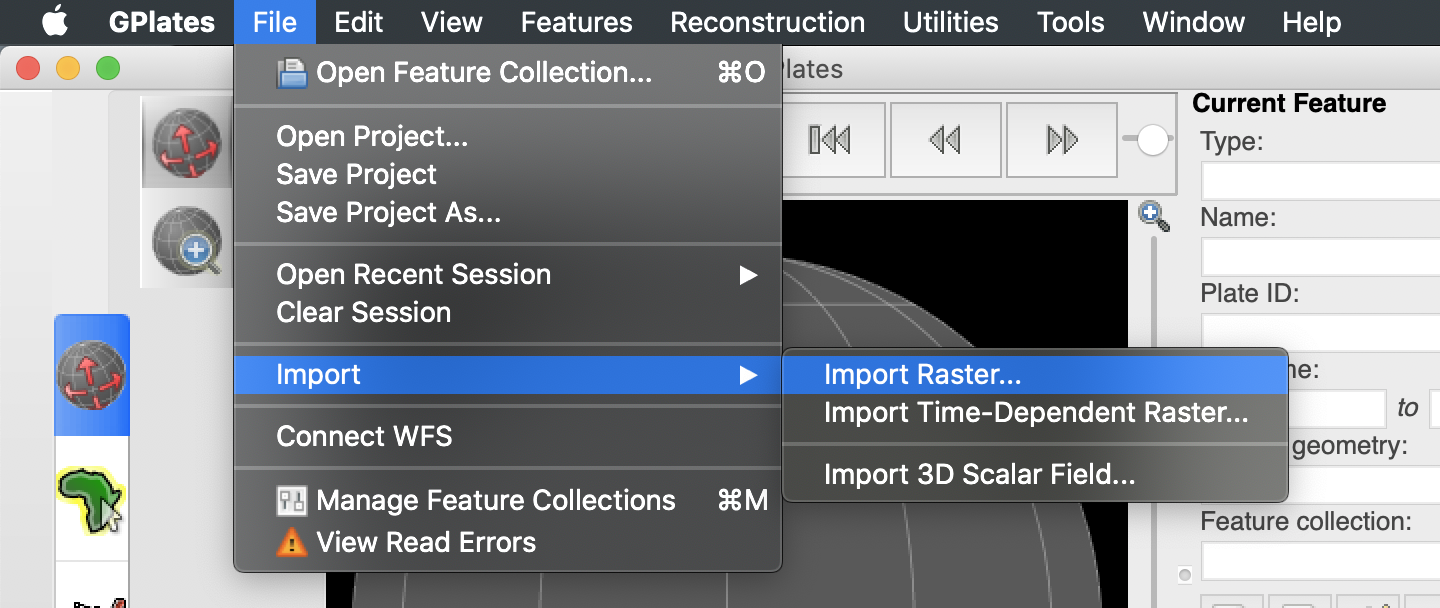
Did you use “import raster” or “open feature collection” to open the image? The “import raster” is the correct way.
---
### Author:  [@yuhang](https://discourse.gplates.org/u/yuhang)
#### Post date: [19 September 2020 02:14 UTC](https://discourse.gplates.org/t/gplates-problem/189/3 "2020-09-19T02:14:21Z")
Yes, I got the same process.I only can’t open the jpg file.
---
### Author:  [@mchin](https://discourse.gplates.org/u/mchin)
#### Post date: [19 September 2020 03:58 UTC](https://discourse.gplates.org/t/gplates-problem/189/4 "2020-09-19T03:58:00Z")
Have you tried other jpg files? Did this problem happen to all jpg files or just this one?
---
### Author:  [@yuhang](https://discourse.gplates.org/u/yuhang)
#### Post date: [19 September 2020 05:47 UTC](https://discourse.gplates.org/t/gplates-problem/189/5 "2020-09-19T05:47:29Z")
I have tried other jpg files just now, it can’t open other jpg files. My GPlates also can’t open the related files in the sample data topography. I downloaded the topography again, but it didn’t work. Thank you very much.
---
### Author:  [@yuhang](https://discourse.gplates.org/u/yuhang)
#### Post date: [19 September 2020 05:57 UTC](https://discourse.gplates.org/t/gplates-problem/189/6 "2020-09-19T05:57:01Z")
I also tried to change the topography jpg file into png file, but it can’t be identified. Thank you !
---
### Author:  [@mchin](https://discourse.gplates.org/u/mchin)
#### Post date: [20 September 2020 10:48 UTC](https://discourse.gplates.org/t/gplates-problem/189/7 "2020-09-20T10:48:46Z")
It seems GPlates cannot open jpg files on your computer. I guess some software conflict with GPlates on your computer. Maybe @john.cannon can help.
Meanwhile, if you can import png file, you can try to convert jpg to png as a workaround.
---
### Author:  [@mchin](https://discourse.gplates.org/u/mchin)
#### Post date: [20 September 2020 10:51 UTC](https://discourse.gplates.org/t/gplates-problem/189/8 "2020-09-20T10:51:35Z")
Maybe try this online converter [https://image.online-convert.com/convert-to-png](https://image.online-convert.com/convert-to-png)
---
### Author:  [@yuhang](https://discourse.gplates.org/u/yuhang)
#### Post date: [20 September 2020 11:23 UTC](https://discourse.gplates.org/t/gplates-problem/189/9 "2020-09-20T11:23:39Z")
It works now, thank you very much!
---
### Author:  [@anon44311652](https://discourse.gplates.org/u/anon44311652)
#### Post date: [20 September 2020 22:32 UTC](https://discourse.gplates.org/t/gplates-problem/189/10 "2020-09-20T22:32:38Z")
Hi yuhang,
Any chance you can provide the steps you took that made it work? It’s useful for other users to know what needed to be done in case we come across this issue again.
Sabin
---
### Author:  [@yuhang](https://discourse.gplates.org/u/yuhang)
#### Post date: [21 September 2020 04:50 UTC](https://discourse.gplates.org/t/gplates-problem/189/11 "2020-09-21T04:50:54Z")
I used the website above to change the jpg file into png file, so that it worked successfully.
---
### Author:  [@john.cannon](https://discourse.gplates.org/u/john.cannon)
#### Post date: [21 September 2020 05:39 UTC](https://discourse.gplates.org/t/gplates-problem/189/12 "2020-09-21T05:39:00Z")
Hi yuhang,
That’s great you have a workaround.
In regard to the original problem (cannot load/import any JPEG files into GPlates) it might be a write permission issue (GPlates caches some raster data to the file system).
In order to help discover the root cause:
1. Are you using GPlates 2.2 ?
- And which operating system (eg, Windows, macOS, Ubuntu 20.04) ?
2. If you copy the problematic JPEG file to the same directory as your converted PNG (the one you successfully imported into GPlates)…
- can you then successfully import that copied JPEG into GPlates (with `File > Import > Import Raster`) ?
Regards,
John