# GPlates crashes when "Enabling Pole" in "Move Pole" tool
**URL:** https://discourse.gplates.org/t/gplates-crashes-when-enabling-pole-in-move-pole-tool/621
**Category:** Bug Reports
**Created:** [2 January 2023 06:10 UTC](https://discourse.gplates.org/t/gplates-crashes-when-enabling-pole-in-move-pole-tool/621 "2023-01-02T06:10:11Z")
**Posts on this page:** 18
**Page:** 2
### Author:  [@MoonTruther](https://discourse.gplates.org/u/MoonTruther)
#### Post date: [14 January 2023 13:39 UTC](https://discourse.gplates.org/t/gplates-crashes-when-enabling-pole-in-move-pole-tool/621/21 "2023-01-14T13:39:33Z")
No crash when the pole does not render !!! Not really a perfect solution as its hard to use the tool without any visual pole. Perhaps rendering it as just a circle could work?
---
### Author:  [@Imalilwilde23](https://discourse.gplates.org/u/Imalilwilde23)
#### Post date: [14 January 2023 14:01 UTC](https://discourse.gplates.org/t/gplates-crashes-when-enabling-pole-in-move-pole-tool/621/22 "2023-01-14T14:01:17Z")
Thats a relief! I wonder how the graphics issue arose though
---
### Author:  [@Imalilwilde23](https://discourse.gplates.org/u/Imalilwilde23)
#### Post date: [14 January 2023 14:34 UTC](https://discourse.gplates.org/t/gplates-crashes-when-enabling-pole-in-move-pole-tool/621/23 "2023-01-14T14:34:12Z")
Btw. I just reinstalled Gplates on my new laptop and the crash does not occur…
---
### Author:  [@Imalilwilde23](https://discourse.gplates.org/u/Imalilwilde23)
#### Post date: [14 January 2023 14:37 UTC](https://discourse.gplates.org/t/gplates-crashes-when-enabling-pole-in-move-pole-tool/621/24 "2023-01-14T14:37:36Z")
Idk if its just me, but reinstalling Gplates on another Laptop fixed the issue
---
### Author:  [@john.cannon](https://discourse.gplates.org/u/john.cannon)
#### Post date: [16 January 2023 11:25 UTC](https://discourse.gplates.org/t/gplates-crashes-when-enabling-pole-in-move-pole-tool/621/25 "2023-01-16T11:25:53Z")
> [@MoonTruther](#):
>
> No crash when the pole does not render !!!
Hmm, that is surprising (that simply rendering the arrow+symbol causes a crash). I’ve sent another test build that renders the symbol but without the arrow.
> [@Imalilwilde23](#):
>
> I just reinstalled Gplates on my new laptop and the crash does not occur
That is unexpected. Is it the same laptop with a new battery (where I’m assuming you only re-installed GPlates, and nothing else)? Or is it a completely new laptop with a reinstalled operating system?
---
### Author:  [@Imalilwilde23](https://discourse.gplates.org/u/Imalilwilde23)
#### Post date: [16 January 2023 15:48 UTC](https://discourse.gplates.org/t/gplates-crashes-when-enabling-pole-in-move-pole-tool/621/26 "2023-01-16T15:48:10Z")
Its a new laptop and different model by the same company
---
### Author:  [@MoonTruther](https://discourse.gplates.org/u/MoonTruther)
#### Post date: [16 January 2023 18:08 UTC](https://discourse.gplates.org/t/gplates-crashes-when-enabling-pole-in-move-pole-tool/621/27 "2023-01-16T18:08:35Z")
rendering just the symbol without an arrow also does not cause a crash. It worked on a blank world and on my project.
---
### Author:  [@wayaan111](https://discourse.gplates.org/u/wayaan111)
#### Post date: [2 March 2023 12:03 UTC](https://discourse.gplates.org/t/gplates-crashes-when-enabling-pole-in-move-pole-tool/621/28 "2023-03-02T12:03:25Z")
Can you please tell me the procedure to fix the issue? Im facing it as well
---
### Author:  [@Imalilwilde23](https://discourse.gplates.org/u/Imalilwilde23)
#### Post date: [2 March 2023 13:45 UTC](https://discourse.gplates.org/t/gplates-crashes-when-enabling-pole-in-move-pole-tool/621/29 "2023-03-02T13:45:59Z")
All i did was reinstall the program, tell me if anything else happens
---
### Author:  [@wayaan111](https://discourse.gplates.org/u/wayaan111)
#### Post date: [2 March 2023 13:58 UTC](https://discourse.gplates.org/t/gplates-crashes-when-enabling-pole-in-move-pole-tool/621/30 "2023-03-02T13:58:05Z")
Oh. I already tried that but it didnt work.
Is there a way I can disable the pole model from rendering when I click enable pole? I think my PC is too slow to render it, which is causing the crash.
---
### Author:  [@Imalilwilde23](https://discourse.gplates.org/u/Imalilwilde23)
#### Post date: [2 March 2023 14:09 UTC](https://discourse.gplates.org/t/gplates-crashes-when-enabling-pole-in-move-pole-tool/621/31 "2023-03-02T14:09:52Z")
You may simply have to wait for John to get back to you on that… sorry
---
### Author:  [@wayaan111](https://discourse.gplates.org/u/wayaan111)
#### Post date: [2 March 2023 14:21 UTC](https://discourse.gplates.org/t/gplates-crashes-when-enabling-pole-in-move-pole-tool/621/32 "2023-03-02T14:21:07Z")
Oh okay. Any idea how long that’ll take?
---
### Author:  [@Imalilwilde23](https://discourse.gplates.org/u/Imalilwilde23)
#### Post date: [2 March 2023 14:31 UTC](https://discourse.gplates.org/t/gplates-crashes-when-enabling-pole-in-move-pole-tool/621/33 "2023-03-02T14:31:47Z")
Honestly dont have a clue
---
### Author:  [@john.cannon](https://discourse.gplates.org/u/john.cannon)
#### Post date: [3 March 2023 03:56 UTC](https://discourse.gplates.org/t/gplates-crashes-when-enabling-pole-in-move-pole-tool/621/35 "2023-03-03T03:56:09Z")
The hacked test build (that I sent MoonTruther) disabled rendering of the Move Pole arrow (so only the symbol was rendered). And that prevented his computer crashing. However it’s not the best solution and I still don’t know why rendering an arrow is crashing on some systems and not others.
> [@wayaan111](#):
>
> Can you please tell me the procedure to fix the issue? Im facing it as well
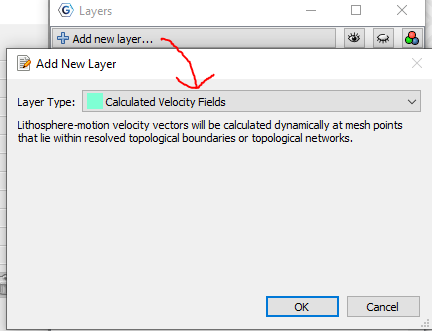
Does it also crash if you have a velocity layer loaded? You can test this by first loading any geometry data (eg, the coastlines file included the the geodata that comes with GPlates) and then loading a rotation file (also in geodata). Then create a velocity layer as shown in the following image…
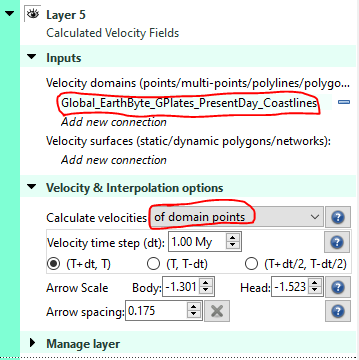
…and then link it to the geometry file (eg, coastlines) under `Velocity domain` and then set `Calculate velocities` to `of domain points`…
…at this point it will either render the velocity arrows…
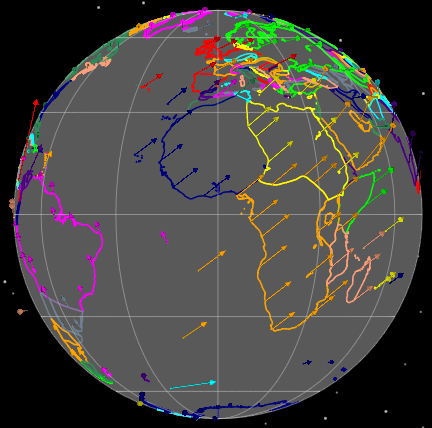
…or it will crash.
Can you tell me which of these happens for you?
---
### Author:  [@wayaan111](https://discourse.gplates.org/u/wayaan111)
#### Post date: [8 March 2023 08:03 UTC](https://discourse.gplates.org/t/gplates-crashes-when-enabling-pole-in-move-pole-tool/621/37 "2023-03-08T08:03:05Z")
Hello, incredibly sorry for the delayed response.
I tried what you suggested, and GPlates crashed for me.
What does this mean?
---
### Author:  [@john.cannon](https://discourse.gplates.org/u/john.cannon)
#### Post date: [8 March 2023 13:43 UTC](https://discourse.gplates.org/t/gplates-crashes-when-enabling-pole-in-move-pole-tool/621/38 "2023-03-08T13:43:38Z")
Thanks for testing that. It means that all arrows in GPlates will crash on your system. I thought it might just be the arrow in the `Move Pole` tool, but it’s happening with velocity arrows too, unfortunately.
It might be a bug in GPlates, related to OpenGL, that only shows up with certain graphics drivers. GPlates is currently moving to Vulkan anyway (so that bug will likely disappear in future).
So at this stage I think I’ll just make a build that disables all arrow rendering - I’ll get back to you this week. It’s not very ideal but it’ll be OK for those users encountering this issue that are also not loading/visualising velocity layers.
---
### Author:  [@wayaan111](https://discourse.gplates.org/u/wayaan111)
#### Post date: [10 March 2023 10:38 UTC](https://discourse.gplates.org/t/gplates-crashes-when-enabling-pole-in-move-pole-tool/621/39 "2023-03-10T10:38:17Z")
Alright. Thanks for the help!
---
### Author:  [@john.cannon](https://discourse.gplates.org/u/john.cannon)
#### Post date: [10 March 2023 12:43 UTC](https://discourse.gplates.org/t/gplates-crashes-when-enabling-pole-in-move-pole-tool/621/40 "2023-03-10T12:43:40Z")
For anyone having the above problem (ie, GPlates crashing when any arrows are rendered in globe view; eg, the pole arrow in the `Move Pole` tool), here’s a hacked build that removes rendering of all arrows (in the globe view) …
Use `gplates_2.3.1-beta.5-no-arrows_win64.zip` from [here](https://cloudstor.aarnet.edu.au/plus/s/ojsYNOyUYE3evNp). It’s the same as version `2.3.1-beta.5` but without the arrows.
[Previous page](https://discourse.gplates.org/t/gplates-crashes-when-enabling-pole-in-move-pole-tool/621.md?page=1)