# Exporting as a colour raster not working
**URL:** https://discourse.gplates.org/t/exporting-as-a-colour-raster-not-working/175
**Category:** Q&A
**Created:** [24 August 2020 13:49 UTC](https://discourse.gplates.org/t/exporting-as-a-colour-raster-not-working/175 "2020-08-24T13:49:06Z")
**Posts on this page:** 4
**Page:** 1
### Author:  [@CreeperTrainz](https://discourse.gplates.org/u/CreeperTrainz)
#### Post date: [24 August 2020 13:49 UTC](https://discourse.gplates.org/t/exporting-as-a-colour-raster-not-working/175/1 "2020-08-24T13:49:06Z")
I am trying to export a map as a .png colour raster file (just a few basic features), but no file is created and when I click export it immediately says complete instead of exporting it. It works for screenshots, but not raster files. Are there any solutions?
---
### Author:  [@john.cannon](https://discourse.gplates.org/u/john.cannon)
#### Post date: [24 August 2020 15:37 UTC](https://discourse.gplates.org/t/exporting-as-a-colour-raster-not-working/175/2 "2020-08-24T15:37:39Z")
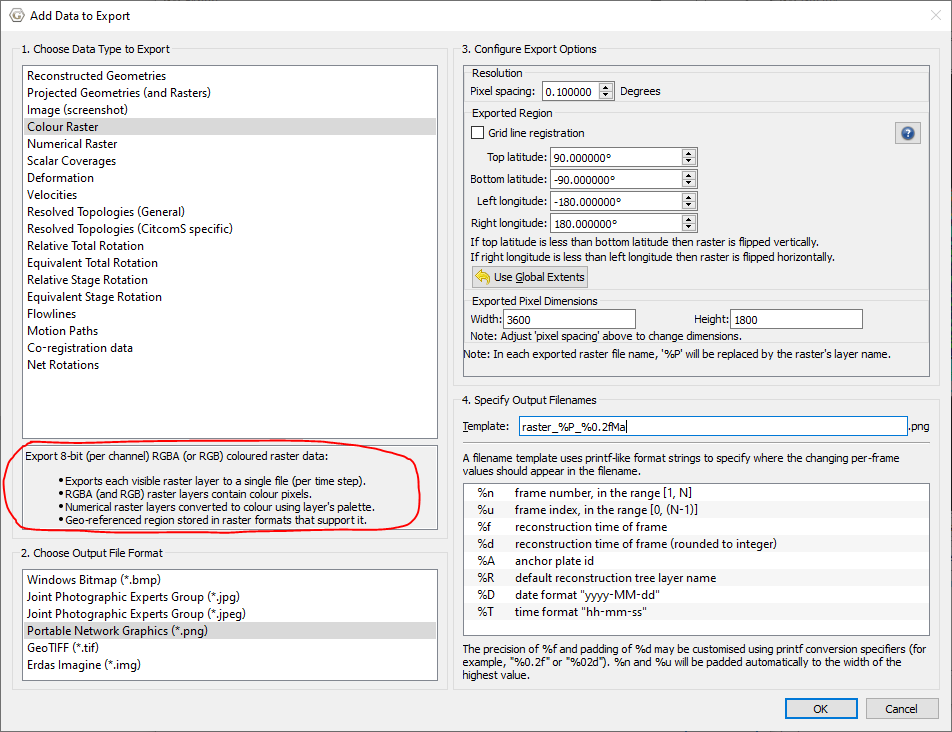
It’s most likely that you don’t have any raster layers loaded. Each raster layer is exported to a separate PNG file in the “Colour Raster” export (see red highlighted part in image below). You might be wanting the “Image (screenshot)” export instead.
---
### Author:  [@CreeperTrainz](https://discourse.gplates.org/u/CreeperTrainz)
#### Post date: [24 August 2020 16:02 UTC](https://discourse.gplates.org/t/exporting-as-a-colour-raster-not-working/175/3 "2020-08-24T16:02:55Z")
I have tried doing a screenshot, but the problem is that it isn’t scaled properly (there isn’t a fixed proportion like 10 pixels = 1 degree), and it isn’t aligned properly (there are large sections of blank space around it). Is there a way to get around this?
---
### Author:  [@john.cannon](https://discourse.gplates.org/u/john.cannon)
#### Post date: [24 August 2020 17:14 UTC](https://discourse.gplates.org/t/exporting-as-a-colour-raster-not-working/175/4 "2020-08-24T17:14:57Z")
It’s just a screenshot of the viewport area - the red part in the image below - my wavy outline 😉 So the black area will be part of the screenshot (and will be transparent). If you scale/rotate the map view it will also reflect in the exported screenshot.
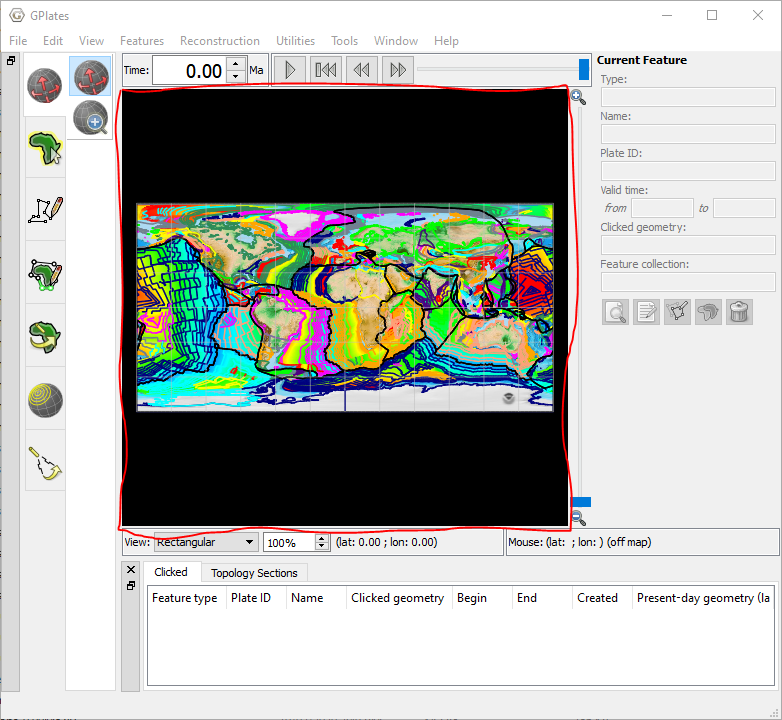
The best you could do is resize the window until it fits nicely, before exporting, something like…