# ColorByProperty draw style not applying colours to shapefile layer in GPlates 2.5.0
**URL:** https://discourse.gplates.org/t/colorbyproperty-draw-style-not-applying-colours-to-shapefile-layer-in-gplates-2-5-0/3244
**Category:** Q&A
**Created:** [22 April 2026 05:18 UTC](https://discourse.gplates.org/t/colorbyproperty-draw-style-not-applying-colours-to-shapefile-layer-in-gplates-2-5-0/3244 "2026-04-22T05:18:29Z")
**Posts on this page:** 2
**Page:** 1
### Author:  [@cchan](https://discourse.gplates.org/u/cchan)
#### Post date: [22 April 2026 05:18 UTC](https://discourse.gplates.org/t/colorbyproperty-draw-style-not-applying-colours-to-shapefile-layer-in-gplates-2-5-0/3244/1 "2026-04-22T05:18:29Z")
Hello,
I am using GPlates 2.5.0 on Windows and I am trying to apply colours to a shapefile layer using the ColorByProperty draw style, but the colours are not being applied to the map.
My setup:
- Layer: a polygon shapefile (MAA\_PJM1997\_pGEOG.shp)
- The shapefile has an attribute field called “ID” with discrete integer values: 10, 20, 30, 40 and 333
- I created a CPT file with the following content:
10 142 217 114 20 186 227 31
20 186 227 31 30 195 194 95
30 195 194 95 40 129 123 11
40 129 123 11 333 170 224 234
What I did in GPlates:
1. Opened the layer panel and clicked “Set Draw style…”
2. Selected ColorByProperty from the list
3. Clicked Add… to create a new configuration
4. Loaded the CPT file using Open…
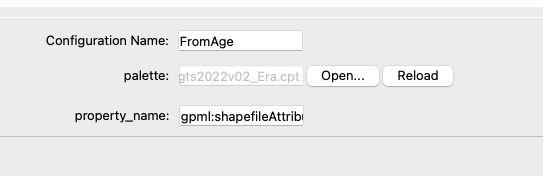
5. Set property\_name to “ID”
6. Clicked Reload and closed the window
The thumbnail in the Draw Style window shows the new configuration selected (blue border), but the map does not change colours at all.
My questions:
- Is “ID” the correct value for property\_name when working with shapefile attributes?
- Is the CPT format I am using correct for GPlates 2.5.0?
- Is there an additional step needed to apply the style to the map?
Thank you in advance.
---
### Author:  [@chhei](https://discourse.gplates.org/u/chhei)
#### Post date: [22 April 2026 07:05 UTC](https://discourse.gplates.org/t/colorbyproperty-draw-style-not-applying-colours-to-shapefile-layer-in-gplates-2-5-0/3244/2 "2026-04-22T07:05:02Z")
Hello @cchan
to use the shapefile attributes you need to put in `gpml:shapefileAttributes:` in the `property_name` field (and not just the attribute name). Then it should work. So in your case: `gpml:shapefileAttributes:ID`.
It’s one of those slightly quirky, unintuitive things in GPlates that you cannot put the direct attribute name in but instead need to refer to the way the file is wrapped into GPlates internal representation in GPML.
The CPT file should be continuous and not have breaks, so I can’t see why the CPT should not work. Seeing that you’re using discrete values it might even be possible to use the GMT-style categorical format for CPTs such as the [example one here](https://github.com/GenericMappingTools/gmt/blob/master/share/cpt/gmt/categorical.cpt) - but you’d need to test that.
Cheers, Christian