# Cmake error while installing Pygplates
**URL:** https://discourse.gplates.org/t/cmake-error-while-installing-pygplates/351
**Category:** Q&A
**Created:** [28 July 2021 19:10 UTC](https://discourse.gplates.org/t/cmake-error-while-installing-pygplates/351 "2021-07-28T19:10:58Z")
**Posts on this page:** 19
**Page:** 1
### Author:  [@thor524](https://discourse.gplates.org/u/thor524)
#### Post date: [28 July 2021 19:10 UTC](https://discourse.gplates.org/t/cmake-error-while-installing-pygplates/351/1 "2021-07-28T19:10:58Z")
Hi,
I’m trying to install pygplates on Ubuntu 18.04. I’ve installed all the dependencies following dep.linux.
I’m getting the following error when I run cmake. Something to do with Boost lib.
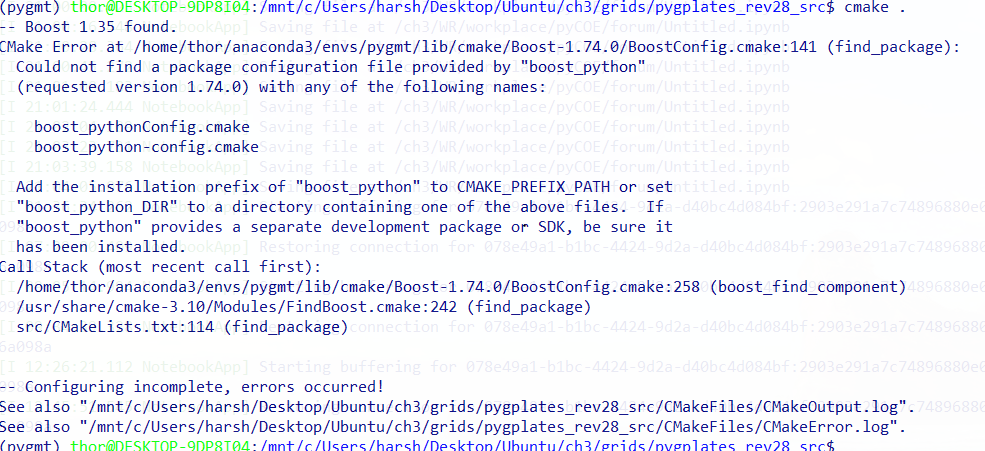
I’m not sure how to resolve this issue. Any leads would be really helpful.
Thanks.
---
### Author:  [@mchin](https://discourse.gplates.org/u/mchin)
#### Post date: [29 July 2021 06:00 UTC](https://discourse.gplates.org/t/cmake-error-while-installing-pygplates/351/2 "2021-07-29T06:00:19Z")
It seems the cmake found Boost 1.35 in the system folder, but it is using the boost-1.74.0 BoostConfig.cmake from conda env “pygmt”. If you need to use pygplates in your conda env, you need to force cmake to use the boost-1.74.0
---
### Author:  [@john.cannon](https://discourse.gplates.org/u/john.cannon)
#### Post date: [29 July 2021 06:06 UTC](https://discourse.gplates.org/t/cmake-error-while-installing-pygplates/351/3 "2021-07-29T06:06:08Z")
Hi Harsha,
It looks like you have activated a conda environment (that you’ve name `pygmt`).
Did you install the dependencies as Ubuntu packages or using conda? I’m assuming the former since you mention the `DEPS.Linux` file which only covers the former. If not, then it’s best to install the dependencies using conda (when you’ve activated a conda environment).
Here are the steps I’ve used to build pygplates using conda dependencies:
Firstly I add the `conda-forge` channel and force the use of only `conda-forge` with strict channel priority (all pygplates dependencies are available on `conda-forge`, so this prevents mixing of channels).
```auto
conda config --add channels conda-forge
conda config --set channel_priority strict
```
Then I created a conda environment called `pygplates_py38` to build pygplates with:
```auto
conda create --name pygplates_py38 python=3.8
```
…in your case your environment is called `pygmt`.
Then I activate the `pygplates_py38` conda environment:
```auto
conda activate pygplates_py38
```
Then I install the pygplates dependencies:
```auto
conda install qt qwt cgal gdal boost proj zlib glew
```
**Update** : Also install cmake with `conda install cmake`. As noted in the [post below](https://discourse.gplates.org/t/cmake-error-while-installing-pygplates/351/9) this is needed on Ubuntu 18.04 (but was not needed on 20.04), but it’s a good idea to do this anyway.
Then I configure pygplates for compilation but instead of running `cmake .` as usual, I run:
```auto
cmake -DCMAKE_PREFIX_PATH:PATH=~/miniconda3/envs/pygplates_py38 .
```
…where `~/miniconda3` is where I installed MiniConda3 (the default location). The `CMAKE_PREFIX_PATH` tells CMake to look for dependencies in the conda environment first before looking in the standard Ubuntu system locations.
Then I compile pygplates:
```auto
make pygplates
```
Then I set the PYTHONPATH environment to the location of the `pygplates.so` just built (it’s in the `bin` sub-directory, but you can copy it elsewhere). Then when I run `python` in my activated environment I can then `import pygplates`.
By the way, we should have a conda package available for the next pyGPlates release so that you don’t need to install the dependencies or compile pygplates, instead just running `conda install pygplates`.
---
### Author:  [@thor524](https://discourse.gplates.org/u/thor524)
#### Post date: [30 July 2021 02:35 UTC](https://discourse.gplates.org/t/cmake-error-while-installing-pygplates/351/4 "2021-07-30T02:35:34Z")
@mchin I’m not sure how to force CMake to use boost-1.74.0. Can you please tell me how to do it?
---
### Author:  [@mchin](https://discourse.gplates.org/u/mchin)
#### Post date: [30 July 2021 02:53 UTC](https://discourse.gplates.org/t/cmake-error-while-installing-pygplates/351/5 "2021-07-30T02:53:59Z")
@thor524
Please see @john.cannon 's reply above. I think the key is` cmake -DCMAKE_PREFIX_PATH:PATH=~/miniconda3/envs/pygplates_py38 .`. And you need to install all the dependencies in your conda env “pygmt”. See john’s reply for details.
---
### Author:  [@mchin](https://discourse.gplates.org/u/mchin)
#### Post date: [30 July 2021 03:00 UTC](https://discourse.gplates.org/t/cmake-error-while-installing-pygplates/351/6 "2021-07-30T03:00:50Z")
Alternatively, you can use `conda build . -c conda-forge`. See the recipe/meta.yaml below.
```auto
package:
name: pygplates
version: 2.1
source:
path: ../
build:
number: 0
requirements:
build:
- cmake
- {{ cdt('xorg-x11-proto-devel') }} # [linux]
- {{ cdt('mesa-libgl-devel') }} # [linux]
- {{ cdt('libx11-devel') }} # [linux]
- {{ cdt('libxext-devel') }} # [linux]
- {{ cdt('libxrender-devel') }} # [linux]
- {{ cdt('mesa-libgl-devel') }} # [linux]
- {{ cdt('mesa-libegl-devel') }} # [linux]
- {{ cdt('mesa-dri-drivers') }} # [linux]
- {{ cdt('libxau-devel') }} # [linux]
- {{ cdt('libdrm-devel') }} # [linux]
- {{ cdt('libxcomposite-devel') }} # [linux]
- {{ cdt('libxcursor-devel') }} # [linux]
- {{ cdt('libxi-devel') }} # [linux]
- {{ cdt('libxrandr-devel') }} # [linux]
- {{ cdt('libxscrnsaver-devel') }} # [linux]
- {{ cdt('libxtst-devel') }} # [linux]
- {{ cdt('libselinux-devel') }} # [linux]
- cgal
- glew
- python
- qt
- boost
- gdal
- proj
- qwt
- zlib
- {{ compiler('c') }}
- {{ compiler('cxx') }}
host:
- {{ cdt('xorg-x11-proto-devel') }} # [linux]
- {{ cdt('mesa-libgl-devel') }} # [linux]
- {{ cdt('libx11-devel') }} # [linux]
- {{ cdt('libxext-devel') }} # [linux]
- {{ cdt('libxrender-devel') }} # [linux]
- {{ cdt('mesa-libgl-devel') }} # [linux]
- {{ cdt('mesa-libegl-devel') }} # [linux]
- {{ cdt('mesa-dri-drivers') }} # [linux]
- {{ cdt('libxau-devel') }} # [linux]
- {{ cdt('libdrm-devel') }} # [linux]
- {{ cdt('libxcomposite-devel') }} # [linux]
- {{ cdt('libxcursor-devel') }} # [linux]
- {{ cdt('libxi-devel') }} # [linux]
- {{ cdt('libxrandr-devel') }} # [linux]
- {{ cdt('libxscrnsaver-devel') }} # [linux]
- {{ cdt('libxtst-devel') }} # [linux]
- {{ cdt('libselinux-devel') }} # [linux]
- cgal
- glew
- python
- qt
- boost
- gdal
- proj
- qwt
- zlib
- {{ compiler('c') }}
- {{ compiler('cxx') }}
run:
- {{ cdt('xorg-x11-proto-devel') }} # [linux]
- {{ cdt('mesa-libgl-devel') }} # [linux]
- {{ cdt('libx11-devel') }} # [linux]
- {{ cdt('libxext-devel') }} # [linux]
- {{ cdt('libxrender-devel') }} # [linux]
- {{ cdt('mesa-libgl-devel') }} # [linux]
- {{ cdt('mesa-libegl-devel') }} # [linux]
- {{ cdt('mesa-dri-drivers') }} # [linux]
- {{ cdt('libxau-devel') }} # [linux]
- {{ cdt('libdrm-devel') }} # [linux]
- {{ cdt('libxcomposite-devel') }} # [linux]
- {{ cdt('libxcursor-devel') }} # [linux]
- {{ cdt('libxi-devel') }} # [linux]
- {{ cdt('libxrandr-devel') }} # [linux]
- {{ cdt('libxscrnsaver-devel') }} # [linux]
- {{ cdt('libxtst-devel') }} # [linux]
- {{ cdt('libselinux-devel') }} # [linux]
- cgal
- glew
- python
- qt
- boost
- gdal
- proj
- qwt
- zlib
- {{ compiler('c') }}
- {{ compiler('cxx') }}
about:
summary: ''
description: ''
extra:
recipe-maintainers:
- mc
```
---
### Author:  [@thor524](https://discourse.gplates.org/u/thor524)
#### Post date: [30 July 2021 03:05 UTC](https://discourse.gplates.org/t/cmake-error-while-installing-pygplates/351/7 "2021-07-30T03:05:22Z")
@john.cannon Thanks for the detailed steps. I created a new environment and followed the steps you mentioned. Still, I get the boost error while running cmake.
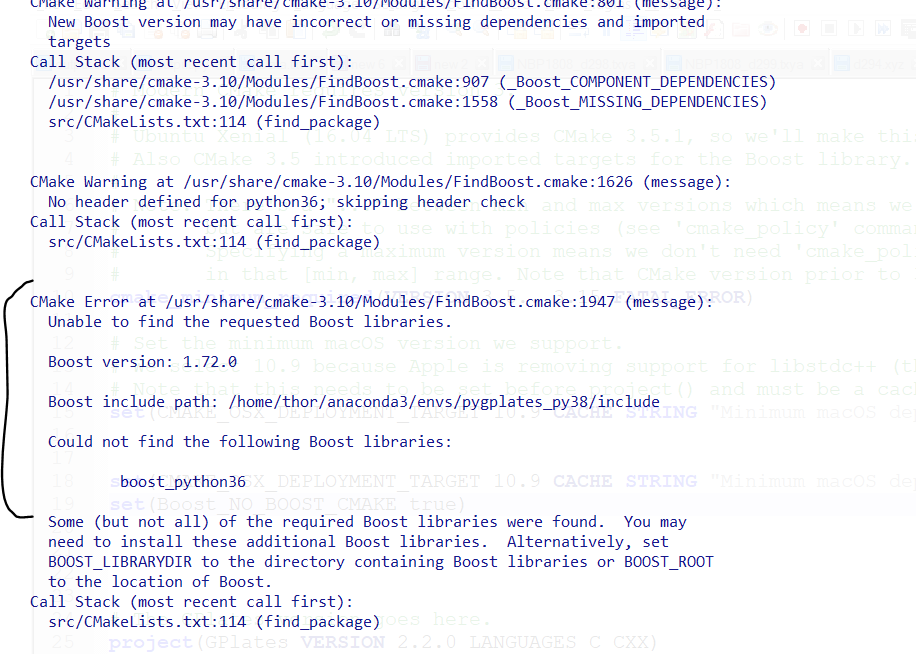
Any suggestions?
---
### Author:  [@thor524](https://discourse.gplates.org/u/thor524)
#### Post date: [30 July 2021 03:06 UTC](https://discourse.gplates.org/t/cmake-error-while-installing-pygplates/351/8 "2021-07-30T03:06:26Z")
@mchin I did try @john.cannon steps by creating a new conda envornment. But still the same boost error.
---
### Author:  [@john.cannon](https://discourse.gplates.org/u/john.cannon)
#### Post date: [30 July 2021 03:37 UTC](https://discourse.gplates.org/t/cmake-error-while-installing-pygplates/351/9 "2021-07-30T03:37:36Z")
> [@thor524](#):
>
> Still, I get the boost error while running cmake.
It’s getting a bit further this time, it’s finding conda’s version of boost now (but only the boost headers, not the libraries).
I had this working on Ubuntu 20.04, but I’ll try Ubuntu 18.04 (same as you) and see if I can reproduce this.
One thing you can try in the meantime is to also install cmake via conda (`conda install cmake`) and then run cmake again - I don’t anticipate this’ll make too much difference but worth a try.
And as Michael noted, the `CMAKE_PREFIX_PATH` is how we’re currently forcing CMake to use the dependencies from conda (instead of the system).
---
### Author:  [@mchin](https://discourse.gplates.org/u/mchin)
#### Post date: [30 July 2021 03:45 UTC](https://discourse.gplates.org/t/cmake-error-while-installing-pygplates/351/10 "2021-07-30T03:45:02Z")
I think now the python version messed up. According to your conda env name, you are using python38. but somehow cmake is trying to find boost\_python36. I guess you need to check the python versions in your conda env. And maybe you can try to check CMakeCache.txt file and see which python has been found.
---
### Author:  [@mchin](https://discourse.gplates.org/u/mchin)
#### Post date: [30 July 2021 03:58 UTC](https://discourse.gplates.org/t/cmake-error-while-installing-pygplates/351/11 "2021-07-30T03:58:45Z")
If you want, you can try `conda build`. I think it is less problematic.
Copy the “recipe” folder into pygplates source code and follow the instructions in the README.MD.
[https://www.earthbyte.org/webdav/ftp/incoming/mchin/pygplates-conda-build.zip](https://www.earthbyte.org/webdav/ftp/incoming/mchin/pygplates-conda-build.zip)
---
### Author:  [@mchin](https://discourse.gplates.org/u/mchin)
#### Post date: [30 July 2021 04:13 UTC](https://discourse.gplates.org/t/cmake-error-while-installing-pygplates/351/12 "2021-07-30T04:13:54Z")
@thor524
I had built a conda package a couple months ago. If you like, you can download the package and use conda to install the local package. You need python37 env. See the README.MD in [https://www.earthbyte.org/webdav/ftp/incoming/mchin/pygplates-conda-build.zip](https://www.earthbyte.org/webdav/ftp/incoming/mchin/pygplates-conda-build.zip)
Download the conda package here ( **THIS IS NOT OFFICIAL BUILD. IT IS JUST MY TEST BUILD!!!** )
[https://www.earthbyte.org/webdav/ftp/incoming/mchin/pygplates-2.1-py37hf484d3e\_0.tar.bz2](https://www.earthbyte.org/webdav/ftp/incoming/mchin/pygplates-2.1-py37hf484d3e_0.tar.bz2)
---
### Author:  [@thor524](https://discourse.gplates.org/u/thor524)
#### Post date: [30 July 2021 04:26 UTC](https://discourse.gplates.org/t/cmake-error-while-installing-pygplates/351/13 "2021-07-30T04:26:19Z")
@mchin…Thanks for the build. Installing it now. Will update you once it’s done.
---
### Author:  [@john.cannon](https://discourse.gplates.org/u/john.cannon)
#### Post date: [30 July 2021 04:32 UTC](https://discourse.gplates.org/t/cmake-error-while-installing-pygplates/351/14 "2021-07-30T04:32:27Z")
> [@john.cannon](#):
>
> One thing you can try in the meantime is to also install cmake via conda (`conda install cmake`) and then run cmake again - I don’t anticipate this’ll make too much difference but worth a try.
Actually installing conda’s cmake worked for me. Prior to that (on Ubuntu 18.04, same as you) I got the following error. I think it’s because the version of the system cmake is only 3.10 whereas conda’s cmake is 3.21 (and so it’s builtin FindBoost script has more bug fixes).
```auto
CMake Error at /home/gplates/miniconda3/envs/pygplates_py38/lib/cmake/Boost-1.72.0/BoostConfig.cmake:120 (find_package):
Could not find a package configuration file provided by "boost_python3"
(requested version 1.72.0) with any of the following names:
boost_python3Config.cmake
boost_python3-config.cmake
Add the installation prefix of "boost_python3" to CMAKE_PREFIX_PATH or set
"boost_python3_DIR" to a directory containing one of the above files. If
"boost_python3" provides a separate development package or SDK, be sure it
has been installed.
Call Stack (most recent call first):
/home/gplates/miniconda3/envs/pygplates_py38/lib/cmake/Boost-1.72.0/BoostConfig.cmake:185 (boost_find_component)
/usr/share/cmake-3.10/Modules/FindBoost.cmake:242 (find_package)
src/CMakeLists.txt:221 (find_package)
```
---
### Author:  [@thor524](https://discourse.gplates.org/u/thor524)
#### Post date: [30 July 2021 04:42 UTC](https://discourse.gplates.org/t/cmake-error-while-installing-pygplates/351/15 "2021-07-30T04:42:50Z")
@john.cannon That’s exactly the same error I got before. Let me try installing conda cmake and see if it worked.
Thanks
---
### Author:  [@thor524](https://discourse.gplates.org/u/thor524)
#### Post date: [30 July 2021 04:53 UTC](https://discourse.gplates.org/t/cmake-error-while-installing-pygplates/351/16 "2021-07-30T04:53:18Z")
@john.cannon @mchin Thanks for all the help. Install cmake using conda finally did the trick!!!
---
### Author:  [@john.cannon](https://discourse.gplates.org/u/john.cannon)
#### Post date: [30 July 2021 07:04 UTC](https://discourse.gplates.org/t/cmake-error-while-installing-pygplates/351/17 "2021-07-30T07:04:50Z")
I’ve discovered a few issues with the pygplates source (in the last public release) _when using conda_. Here are the fixes:
1. **Was finding the system `qwt` instead of conda’s `qwt`** :
To fix this, edit `cmake/modules/FindQwt.cmake` and insert `NAMES_PER_DIR` as shown below (but without the `+` sign):
```auto
find_library(QWT_LIBRARY
# The '-qt5' versions searched first (in case 'qwt' is a qt4 version)...
NAMES qwt-qt5 qwt6-qt5 qwt qwt6
+ NAMES_PER_DIR
PATHS
/usr/lib
/usr/local/lib
```
2. **Was finding the system `proj` instead of conda’s `proj`**
To fix this, edit `cmake/modules/FindPROJ.cmake` and insert `proj.h ` before **every** occurrence of `proj_api.h`. An example of this is shown in the diff below:
```auto
- FIND_PATH(PROJ_INCLUDE_DIR proj_api.h
+ FIND_PATH(PROJ_INCLUDE_DIR proj.h proj_api.h
```
Without this you would get a runtime error like `undefined symbol: pj_free` when importing pygplates.
3. **A compile error: `invalid use of incomplete type ‘class QwtText’`** :
To fix this, edit `src/qt-widgets/KinematicGraphPicker.h` and insert `#include "qwt_text.h"` as shown below (but without the `+` sign):
```auto
#include "qwt_plot_canvas.h"
#include "qwt_plot_picker.h"
+#include "qwt_text.h"
```
This is needed because conda upgraded `qwt` from 6.1 to 6.2.
I would suggest starting with a fresh install of the source code you have (ie, delete your current source code directory and extract it again). Then try the above edits. And then run `cmake` and `make`, as before. Once I did this I was able to successfully compile pygplates with conda and import it into conda’s Python.
These fixes are in the latest development source code (and will be available in the next public release).
Running the conda-build script might have similar problems because it is essentially building in the same way - which is why we will be providing a conda package for pygplates for the next public release (along the lines of Michael’s test build) so that users don’t have to go through this.
---
### Author:  [@thor524](https://discourse.gplates.org/u/thor524)
#### Post date: [30 July 2021 12:28 UTC](https://discourse.gplates.org/t/cmake-error-while-installing-pygplates/351/18 "2021-07-30T12:28:55Z")
@john.cannon make pygplates failed and was giving me some errors. I’m going to make the changes you suggested and try it again
---
### Author:  [@thor524](https://discourse.gplates.org/u/thor524)
#### Post date: [30 July 2021 20:31 UTC](https://discourse.gplates.org/t/cmake-error-while-installing-pygplates/351/19 "2021-07-30T20:31:25Z")
@john.cannon I was able to successfully build and install pygplates. Thanks